By continuing, you agree to LoansJagat's Credit Report Terms of Use, Terms and Conditions, Privacy Policy, and authorize contact via Call, SMS, Email, or WhatsApp
Disclaimer: The information published on LoansJagat is intended for general informational and educational purposes only and should not be considered financial, legal, or investment advice. Interest rates, loan terms, statistics, and other data may change over time and may vary by lender or source. Please verify the latest information and consult a qualified financial advisor or the respective Bank/NBFC before making any financial decisions.
Apply for Loans Fast and Hassle-Free
Subscribe Now
About the author

LoansJagat Team
‘Simplify Finance for Everyone.’ This is the common goal of our team, as we try to explain any topic with relatable examples. From personal to business finance, managing EMIs to becoming debt-free, we do extensive research on each and every parameter, so you don’t have to. Scroll up and have a look at what 15+ years of experience in the BFSI sector looks like.
Related Blog Post
Simplify All Your Loans Into One Affordable EMI

Customers Served

Debt Consolidated

1200+ Reviews

Locations in India
Club all Loans & Credit Card Bills into Single EMI

Quick Apply Loan
Consolidate your debts into one easy EMI.

Takes less than 2 minutes. No paperwork.

10 Lakhs+
Trusted Customers

2000 Cr+
Loans Disbursed

4.7/5
Google Reviews

50+
Banks & NBFCs Offers
Other services mentioned in this article
To cancel the autopay in GPay in iPhone, one needs to visit the GPay app, click on 'payment options', and visit the 'subscription' tab. Select the OTT platform like Netflix and turn off the autopay. Your auto payment system will be stopped until you turn it on for the next time. This is one of the easiest and simplest ways to show how to cancel autopay in GPay in iPhone.
Key takeaways:
How to cancel autopay in GPay on an iPhone?
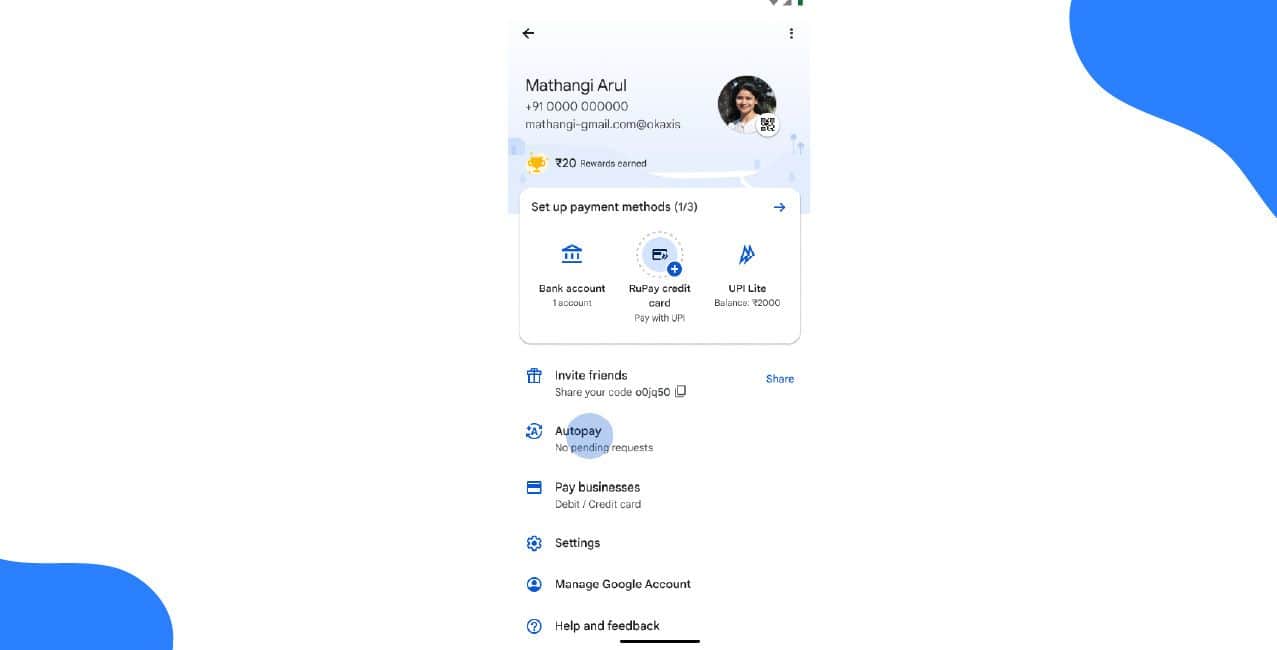
To cancel the autopay in GPay on an iPhone, one needs to visit the GPay app, click on 'payment options', and visit the 'subscription' tab. Select the OTT platform and select “Cancel Autopay”.
These are the following steps, according to the Indian Express news article of 2025, for how to cancel autopay in Gpay in iphone:
This is how one can successfully stop AutoPay for OTT subscriptions.
How to cancel autopay in PhonePe?
To cancel the autopay in PhonePe, one needs to open the PhonePe app, visit the profile icon, select the subscription option or autopay accordingly and click on “delete the autopay” for the selected OTT platform.
These are the simple steps for how to cancel autopay in PhonePe, according to the CreditMantri article on the website:
Results:
Remember: If you do not find the subscription on GPay, check it through the provider’s app or website.
Hence, this is how to cancel autopay in PhonePe.
How to set autopay in GPay for a person?
To set the autopay in GPay for a person, one needs to do the initial payment for the first time through the GPay app. Later, choose the “Autopay” option and fill in the mandatory details regarding the recurring process gap. Set the PIN; it is all done.
These are the steps for how to set autopay in GPay for a person:
Hence, the autopay will be set, and deductions will be initiated according to the date or gap you have set in filling in details. So, this is how to set autopay in GPay for a person.
Select Subscription
*T&C Apply
To cancel the autopay in GPay for Hotstar, one needs to visit the GPay app, click on 'payment options', and visit the 'subscription' tab. Select the OTT platform like Hotstar and select “Cancel Autopay”.
In detail, these are the steps for how to cancel the autopay in GPay for Hotstar:
Hence, this is how to cancel the auto-pay for Hotstar in GPay.
How to cancel autopay in GPay for Netflix?
To cancel the autopay in GPay for Hotstar, one needs to visit the GPay app, click on 'payment options', and visit the 'subscription' tab. Select the OTT platform like Netflix and select “Cancel Autopay”.
In detail, these are the steps for how to cancel the autopay in GPay for Netflix:
Hence, this is how to cancel the auto-pay for Netflix in GPay.
How to cancel autopay in GPay for Amazon Prime?
To cancel the autopay in GPay for Hotstar, one needs to visit the GPay app, click on 'payment options', and visit the 'subscription' tab. Select the OTT platform, like Amazon Prime, and select “Cancel Autopay”.
In detail, these are the steps for how to cancel the autopay in GPay for Amazon Prime:
Hence, this is how to cancel the auto-pay for Amazon Prime in GPay.
What If You Can’t Cancel AutoPay?
One needs to contact the bank's customer support or the bank directly to stop the future charges for a particular period until asked for the next.
One can directly stop payments by going directly to Spotify. Remember, if GPay doesn't work, try the service provider directly.
Bottom line:
One can cancel the autopay set through GPay and PhonePe by following the easy steps by clicking on the “subscription” option to cancel the auto-pay. In fact, the registered bank also provides customer support if the cancellation of Autopay cannot be done on the user's side.
FAQs
How do I know if I have AutoPay enabled?
Check the "Subscriptions" section in GPay under Payments. If you see any active services with automatic renewal, AutoPay is on.
Will I get a refund if I cancel AutoPay?
No, cancelling stops future payments only. You won’t get your money back for the current billing period.
Can I pause AutoPay instead of cancelling?
Some services allow pausing, but most require full cancellation. Check the app or website of the service you subscribed to.
What if the subscription doesn’t appear in GPay?
Try cancelling directly through the service provider’s app or website (like Netflix or Spotify).
Why is money still being taken after I cancelled?
If payments continue, contact the service provider or your bank to block future transactions.
Will my service stop immediately after cancelling?
No, you keep access until the current billing cycle ends (e.g., if you paid monthly, it works till month-end).
Do I need to delete my account after cancelling AutoPay?
No, cancelling AutoPay only stops payments. Your account stays active unless you delete it separately.
Can I restart AutoPay later?
Yes, just resubscribe through GPay or the service provider, and AutoPay will turn on again.
What if the "Cancel" button is missing in GPay?
Some subscriptions must be cancelled through the service’s app or website, not GPay.
How do I stop all AutoPay subscriptions at once?
GPay doesn’t have a "cancel all" option. You must turn off each subscription one by one.












