By continuing, you agree to LoansJagat's Credit Report Terms of Use, Terms and Conditions, Privacy Policy, and authorize contact via Call, SMS, Email, or WhatsApp
Disclaimer: The information published on LoansJagat is intended for general informational and educational purposes only and should not be considered financial, legal, or investment advice. Interest rates, loan terms, statistics, and other data may change over time and may vary by lender or source. Please verify the latest information and consult a qualified financial advisor or the respective Bank/NBFC before making any financial decisions.
Apply for Loans Fast and Hassle-Free
Subscribe Now
About the author

LoansJagat Team
‘Simplify Finance for Everyone.’ This is the common goal of our team, as we try to explain any topic with relatable examples. From personal to business finance, managing EMIs to becoming debt-free, we do extensive research on each and every parameter, so you don’t have to. Scroll up and have a look at what 15+ years of experience in the BFSI sector looks like.
Related Blog Post
Simplify All Your Loans Into One Affordable EMI

Customers Served

Debt Consolidated

1200+ Reviews

Locations in India
Club all Loans & Credit Card Bills into Single EMI

Quick Apply Loan
Consolidate your debts into one easy EMI.

Takes less than 2 minutes. No paperwork.

10 Lakhs+
Trusted Customers

2000 Cr+
Loans Disbursed

4.7/5
Google Reviews

50+
Banks & NBFCs Offers
Other services mentioned in this article
Imagine this: Rohan, a young entrepreneur from Mumbai, just cracked a massive deal with a supplier. He excitedly logs into his HDFC internet banking account, ready to transfer ₹7,00,000 to seal the deal. Boom! He hits a wall. His current transfer limit is just ₹2,00,000. Ouch.
“Yeh kya jhol hai?” he screams, dumbfounded. A deal worth lakhs, stuck because of a digital ceiling.
Sounds familiar?
Whether you're sending rent to your landlord, paying for your cousin's wedding decorations, or funding your new sneaker reselling side hustle, hitting a low transfer limit can be a serious buzzkill. But worry not. This blog is here to transform you from a "limited customer" into a "limitless boss".
In this comprehensive guide on increasing the transfer limit in HDFC, we will break down every step, crunch some real numbers, explore net banking tricks, and ensure you can surpass that limit like a bullet train.
"Paisa transfer karna hai toh limit ka bhandhan todna padega!"
Let us dive into the world of digital limit upgrades, HDFC style. Ready? Chalo, shuru karein!
Banks impose limits to protect users from fraud, unauthorised access, and large erroneous transactions. These limits vary based on the transaction method, recipient, and banking channel.
HDFC Bank, like all responsible banks, has a range of transfer types such as NEFT, RTGS, and Immediate Payment Service. While this protects your money, it can also feel like a hurdle when you need to send large amounts urgently.
Here is a quick glance at HDFC’s default limits:
How to increase the transfer limit in HDFC? You need to adjust the settings either through HDFC Net Banking or the HDFC Mobile Banking App.
Sanjay, a digital marketing freelancer in Pune, had to make a payment of 6,00,000 Rupees to a vendor. His default Immediate Payment Service limit was only 2,00,000 Rupees.
Frustrated, he contacted customer care but was advised to log in to NetBanking and increase the limit himself. Within 24 hours, his limit was upgraded to 5,00,000 Rupees, and he was able to make the payment without stress.
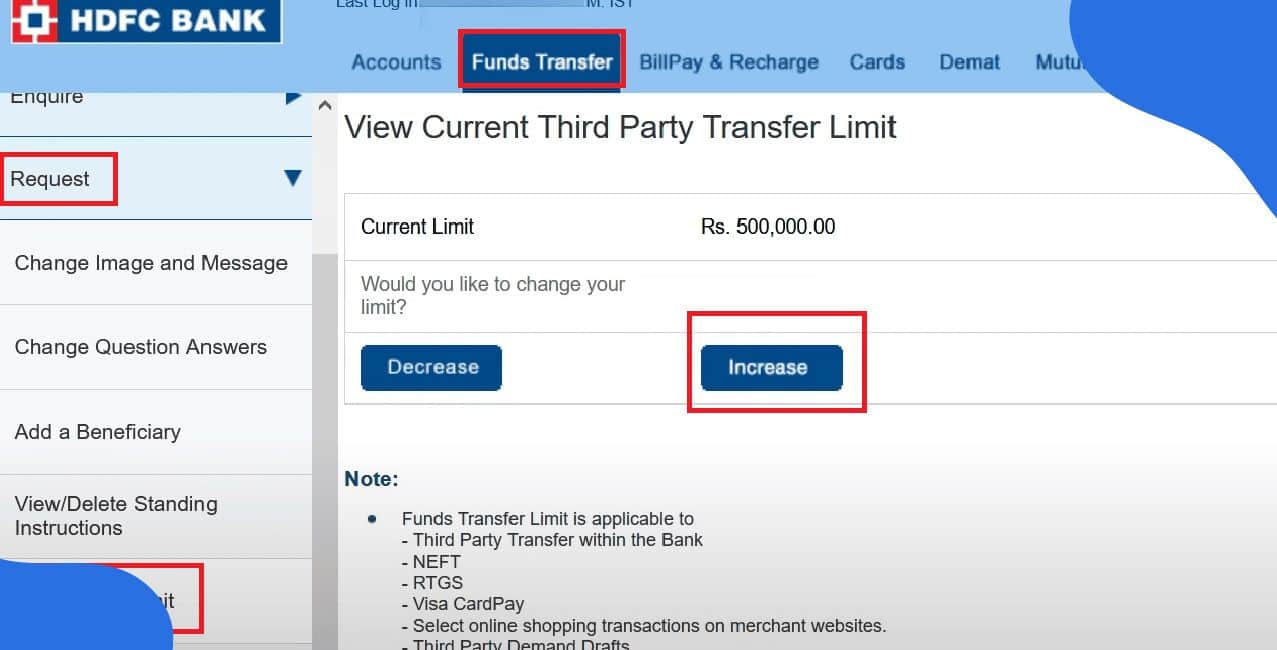
To increase your transfer limit via HDFC NetBanking, follow these steps precisely:
Suppose you need to make two transfers of 6,50,000 Rupees and 3,00,000 Rupees tomorrow.
Total amount needed to transfer = 6,50,000 + 3,00,000 = 9,50,000 Rupees
If your current limit is 2,00,000 Rupees:
Required increase = 9,50,000 - 2,00,000 = 7,50,000 Rupees
You must update your limit to at least 9,50,000 Rupees to accommodate both transfers.
The request is typically updated immediately, unless it is flagged for verification.
*T&C Apply
Priya runs a jewellery boutique in Jaipur. During the festive season, her vendor payments cross 8,00,000 Rupees daily. She smartly upgraded her transfer limit early through the mobile app, ensuring smooth festive operations.
Her proactive approach helped her avoid late penalties and vendor frustration.
If digital routes are not your thing, visit your nearest HDFC branch. Fill out a Transfer Limit Modification Form. Submit with ID proof.
Alternatively, call HDFC PhoneBanking. Authenticate yourself and request an increase to your transfer limit. The executive may give instructions or send a verification link.
Visit HDFC Customer Support for more contact options.
Pro Tip: Schedule large transactions during off-peak hours, such as early mornings or late nights, to avoid processing delays.
Let us say you transfer funds worth 4,00,000 Rupees daily.
Daily Limit = 4,00,000 Rupees
Monthly Limit = 4,00,000 × 30 = 1,20,00,000 Rupees
Annual Transfer Total = 1,20,00,000 × 12 = 14,40,00,000 Rupees
If you are a small business owner, this figure highlights how essential it is to set a high transfer ceiling.
"Paise ka hisaab rakhna hai, toh limit bhi maximum rakhna hai!"
Now you know exactly how to increase transfer limit in HDFC and why it matters. Whether you are an entrepreneur in Surat, a property buyer in Noida, or a freelancer in Kochi, your financial flexibility lies in that simple setting.
Make it a habit to review your transfer limits every quarter. Stay ahead of the curve. Plan large payments. Most importantly, protect your accounts while enjoying the power of seamless banking.
"Limit badhao, paisa chalao; bina kisi rukawat ke!"
To upgrade your limit now, visit the official HDFC NetBanking or download the HDFC Mobile App.
Can I reduce the limit later if needed?
Yes, you can easily reduce your transfer limit at any time. Simply follow the same steps used for increasing the limit through HDFC NetBanking or the mobile banking app. Just enter a lower amount and confirm the change using the one-time password.
Is there a maximum cap for increasing transfer limits?
Yes, there is. For most types of third-party transfers, the maximum cap is 10,00,000 Rupees per day. For Immediate Payment Service transactions, the maximum limit is usually 5,00,000 Rupees per day. Always check the current caps on the official HDFC portal.
Will increasing the transfer limit affect my account type or banking fees?
No, modifying your transfer limit does not change your account type or incur any extra charges. Your account continues to operate under the same terms and conditions unless explicitly changed by you or the bank.
How quickly does the updated transfer limit take effect?
In most cases, the change is reflected immediately or within thirty minutes. However, sometimes it may take up to twenty-four hours depending on the verification process or server load.
Can I increase transfer limits for all my beneficiaries at once?
No, the transfer limit increase applies to the overall third-party transfer limit and not to individual beneficiaries. You cannot assign separate limits to different recipients. The modified limit is the total cap for all third-party transfers combined.












