By continuing, you agree to LoansJagat's Credit Report Terms of Use, Terms and Conditions, Privacy Policy, and authorize contact via Call, SMS, Email, or WhatsApp
Disclaimer: The information published on LoansJagat is intended for general informational and educational purposes only and should not be considered financial, legal, or investment advice. Interest rates, loan terms, statistics, and other data may change over time and may vary by lender or source. Please verify the latest information and consult a qualified financial advisor or the respective Bank/NBFC before making any financial decisions.
Apply for Loans Fast and Hassle-Free
Subscribe Now
About the author

LoansJagat Team
‘Simplify Finance for Everyone.’ This is the common goal of our team, as we try to explain any topic with relatable examples. From personal to business finance, managing EMIs to becoming debt-free, we do extensive research on each and every parameter, so you don’t have to. Scroll up and have a look at what 15+ years of experience in the BFSI sector looks like.
Related Blog Post
Simplify All Your Loans Into One Affordable EMI

Customers Served

Debt Consolidated

1200+ Reviews

Locations in India
Club all Loans & Credit Card Bills into Single EMI

Quick Apply Loan
Consolidate your debts into one easy EMI.

Takes less than 2 minutes. No paperwork.

10 Lakhs+
Trusted Customers

2000 Cr+
Loans Disbursed

4.7/5
Google Reviews

50+
Banks & NBFCs Offers
Other services mentioned in this article
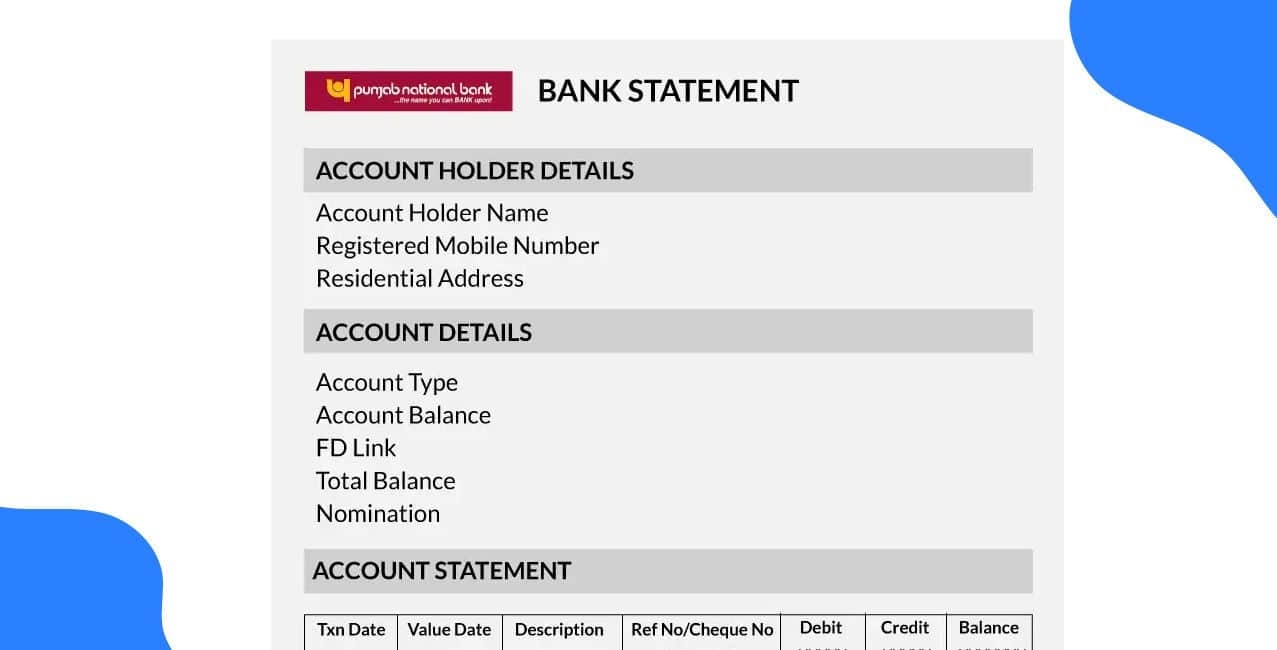
The PNB Bank Statement help customers to overview the income and expenses by looking at the Bank Statement.
Example:
Nitin wants a home loan, and the statement helps him secure a loan because it demonstrates that he can afford the repayments.
The following table illustrates key components analysed in a bank statement for a loan application:
This table shows how each element boosts the bank's financial profile. A strong transaction history is beneficial when applying for a loan.
This blog is here to simplify the PNB Bank Statement for you! Next up, we'll dive into how you can easily obtain your PNB Bank Statement.
How to get a PNB Bank Statement?
A PNB Bank Statement can be obtained easily online and offline. It provides a formal transaction record that is necessary for multiple verification processes.
For example, Aman, the owner of a shoe showroom, is seeking a business loan to expand his venture. If lenders evaluate his company's cash flow and financial health, he needs to provide his bank statement. Let's get him on the growth path!
Aman has a few simple ways to request his statement. Here’s a quick overview of the options available to him:
This table highlights how PNB makes it easy and convenient for customers to access and secure their financial documents.
For Aman's loan application, this statement is extremely useful:
These points collectively provide a comprehensive financial snapshot, proving the business's credibility and strengthening its loan application.
Bonus Tip: Punjab National Bank mini statement services are available 24 hours a day, letting consumers access their accounts anytime and from anywhere.
PNB Bank Mini Statement vs Full Statement
A PNB Full Statement offers a thorough record for a chosen period, whereas a Mini Statement gives a brief overview of recent transactions. The user's immediate financial need is the primary factor influencing their decision.
For instance, when Rahul thinks he’s been charged incorrectly, he can easily pull up a mini statement on his phone to check the last few transactions.
On the other hand, Akash needs to provide a detailed, stamped statement of his finances for the past six months for his visa application. Different needs, different solutions!
The core differences between these two services are highlighted in the table below:
Branch Visit
*T&C Apply
The mini statement is perfect for quick daily checks of your finances. In comparison, the full statement is better for official use when a detailed record is necessary. Next, we'll discuss PNB Bank Statement: Common Issues & Troubleshooting.
PNB Bank Statement: Common Issues & Troubleshooting
Having difficulty accessing your PNB bank statement is a common problem in financial management. Effective troubleshooting requires prompt identification of the problem and the application of the appropriate solution.
For example, Devam is in a bit of a bind! He needs to send his statement for an invoice, but keeps running into an "Error 102: Service Temporarily Unavailable" while trying to download it. He’s looking for a quick solution so he won't delay his payment. Any tips?
Several common issues may occur, each with a logical fix. The following table highlights these recurring problems and their solutions.
This table shows that most statement-related issues can be easily resolved. Whether it's a quick self-service fix or a simple call to customer support, help is readily available!
When Devam sees "Error 102," he knows to stay patient and try again later, as it’s likely a server issue. If he faces continuous problems, such as incorrect transactions, he should visit the branch and resolve the issue.
Bonus Tip: You can get the PNB Statement by calling the customer care. (Missed call on Toll-free (1800 180 2223)/Toll no (01202303090)
Conclusion
That concludes it! With this guide, we hope you have a better understanding of your PNB Bank Statement, including what it is, how to obtain it, and how to resolve common problems.
Your statement is an essential component of your financial journey, whether you're like Nitin applying for a home loan, Aman expanding his business, or Devam fixing a mistake. You can accomplish your goals if you keep it close at hand and make sure it's accurate.
FAQs
After registering for email statements, will my physical statements be discontinued?
When you choose email statements, you will stop receiving paper statements. If you need a copy, you can always visit your local branch to request one.
Who can register for PNB email statements?
Any PNB customer with a savings, current, credit card, or overdraft account can sign up to receive email statements.
What is the password of the PNB statement?
Your PNB statement password is your 16-digit account number. Use this number to open your e-statement PDF.
How to open the PNB bank e-statement PDF password?
Open the PNB bank statement PDF from your email. When asked for a password, enter your account number and press 'Enter' to view your statement.