By continuing, you agree to LoansJagat's Credit Report Terms of Use, Terms and Conditions, Privacy Policy, and authorize contact via Call, SMS, Email, or WhatsApp
Disclaimer: The information published on LoansJagat is intended for general informational and educational purposes only and should not be considered financial, legal, or investment advice. Interest rates, loan terms, statistics, and other data may change over time and may vary by lender or source. Please verify the latest information and consult a qualified financial advisor or the respective Bank/NBFC before making any financial decisions.
Apply for Loans Fast and Hassle-Free
Subscribe Now
About the author

LoansJagat Team
‘Simplify Finance for Everyone.’ This is the common goal of our team, as we try to explain any topic with relatable examples. From personal to business finance, managing EMIs to becoming debt-free, we do extensive research on each and every parameter, so you don’t have to. Scroll up and have a look at what 15+ years of experience in the BFSI sector looks like.
Related Blog Post
Simplify All Your Loans Into One Affordable EMI

Customers Served

Debt Consolidated

1200+ Reviews

Locations in India
Club all Loans & Credit Card Bills into Single EMI

Quick Apply Loan
Consolidate your debts into one easy EMI.

Takes less than 2 minutes. No paperwork.

10 Lakhs+
Trusted Customers

2000 Cr+
Loans Disbursed

4.7/5
Google Reviews

50+
Banks & NBFCs Offers
Other services mentioned in this article
After nearly seven years of using digital wallets, Arjun began to grow increasingly concerned about his online privacy. He received over 50 promotional messages each month from financial applications, e-commerce platforms, and service providers. His inbox was cluttered, and his digital footprint expanded without his full understanding or consent.
Upon reviewing his activity log, Arjun discovered that his Paytm account had recorded 13 device logins in the past year. One occurred from a location 500 kilometres away, which he did not recognise. Although the transaction was later identified as a promotional cashback, the unrequested notification unsettled him deeply.
Motivated by privacy concerns and a growing mistrust of digital platforms, Arjun returned to traditional banking methods. He searched for “how to deactivate Paytm account” and expected a simple solution. Instead, he found fragmented instructions, outdated guidance, and unclear outcomes, making the process unnecessarily complicated.
Read More - How to Stop Autopay in PhonePe
To offer clarity to users like Arjun, this blog presents a step-by-step, factual, and structured guide on how to deactivate a Paytm account. Whether one has used Paytm for 2 months or 12 years, or has an account balance of ₹0 or ₹5,000, this guide covers every critical detail, from practical instructions to consequences and FAQs.
This post is designed to explain how to deactivate a Paytm account and help you decide whether it is the right move. Shall we move on to the steps or cover consequences next?
Before diving into the procedure, let us first explore why someone may wish to know how to deactivate a Paytm account:
Consider Priya, a university student who opened three mobile wallet accounts during promotional campaigns. Over time, she forgot which account was linked to which bank, leading to confusion. She decided to clean her digital presence and began by learning how to deactivate her Paytm account, as it was the least used.
Before understanding how to deactivate a Paytm account, users must ensure they meet the following conditions:
For instance, Raj had ₹1,487 in his wallet. Before proceeding, he transferred the balance to his bank account. Post-transfer, his wallet showed ₹0, making him eligible to proceed. If he ignored this and tried to close the account, he would have faced an error, wasting valuable time.
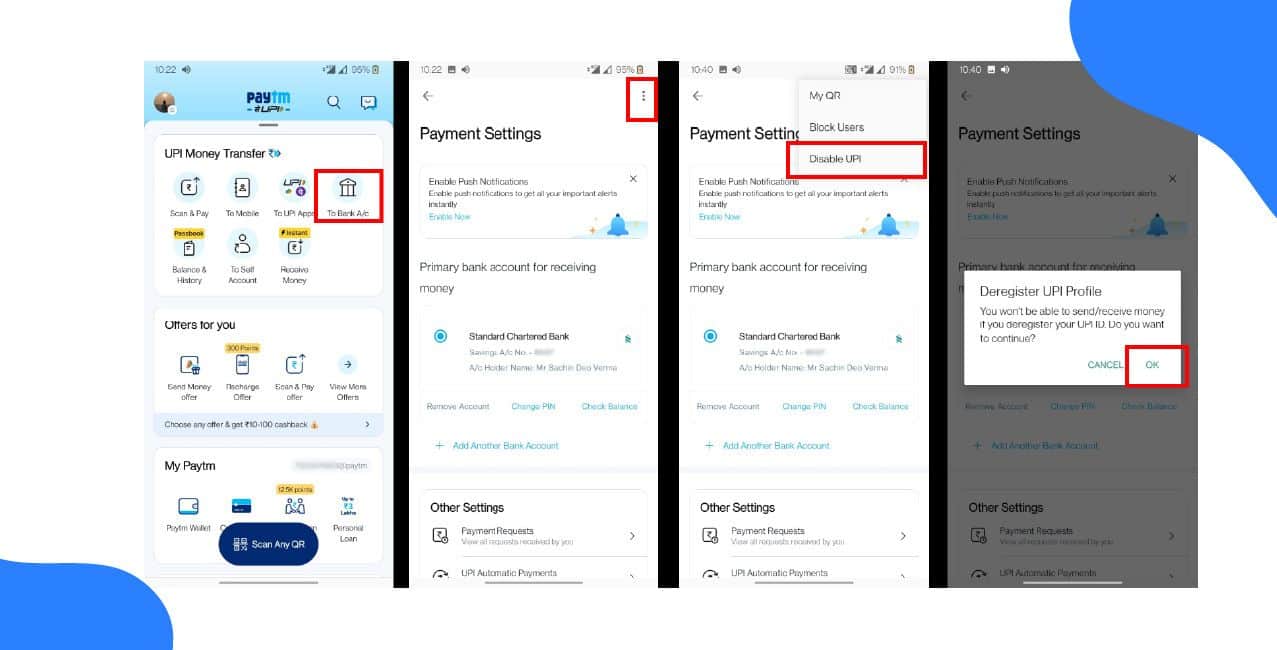
Now, let us explain exactly how to deactivate a Paytm account. While the platform does not allow instant deletion via a simple button, the process is manageable.
Navigate to the Paytm application and log in with the registered mobile number and password.
On the homepage, scroll to the 'Help and Support' option at the bottom or within the settings menu. This is your portal to reach customer service.
Choose “Profile Settings” followed by “I want to close/delete my account”. If this option is not visible immediately, search for “delete account” in the query bar.
You will now be directed to a screen with multiple steps asking why you wish to deactivate the account. Select the reason most relevant to you – privacy, duplication, or inactivity.
The user must verify the account through a one-time code or identity confirmation. Once verified, the user can submit the request.
Paytm customer care should process the request and deactivate the account within 24 to 48 hours. A confirmation message or email is generally sent as evidence.
Below is the simplified table showing the
*T&C Apply
Let us use a practical calculation example to justify why one might want to learn how to deactivate a Paytm account. Assume that Priya receives marketing notifications that tempt her to make small, impulsive purchases of ₹200 twice a week.
Calculation:
₹200 x 2 times per week = ₹400
₹400 x 4 weeks = ₹1,600 per month
₹1,600 x 12 months = ₹19,200 per year
By deactivating her Paytm account, Priya potentially saves nearly ₹20,000 annually by avoiding unnecessary spending driven by push notifications and in-app promotions.
Also Read – How to Cancel AutoPay on Netflix
This financial discipline could then be redirected into savings, investment, or educational resources.
After completing the how to deactivate Paytm account procedure, users should note the following:
If the user later changes their mind, reactivation may not be straightforward. Generally, a new account must be created using the same phone number, but old data may not be fully retrievable. That is why, before going through the process of how to deactivate Paytm account, one must be sure of their decision.
Learning how to deactivate Paytm account is more than just a technical exercise; it is an act of digital responsibility. As more users across India and the globe become aware of their online presence, they are making informed decisions about where and how personal financial data is stored. is important
Whether the motivation is financial control like Priya, professional security like James, or peace of mind like Arjun, knowing how to deactivate the Paytm account gives users the power to regain control of their digital lives.
2. Will deactivating my Paytm account affect my linked FASTag or insurance policies?
Yes, any services such as Fastag, insurance, or digital gold linked to your account will be terminated when you complete the steps to deactivate your Paytm account. Delinking or transferring such services beforehand is advised to avoid any disruption.
3. Is it necessary to clear all dues before deactivating the account?
Absolutely. A user must ensure that all outstanding loans, postpaid bills, and subscriptions are settled. The deactivation request will not be processed if the account has any unpaid balance. The system may flag the account until all financial obligations are cleared.












