By continuing, you agree to LoansJagat's Credit Report Terms of Use, Terms and Conditions, Privacy Policy, and authorize contact via Call, SMS, Email, or WhatsApp
Disclaimer: The information published on LoansJagat is intended for general informational and educational purposes only and should not be considered financial, legal, or investment advice. Interest rates, loan terms, statistics, and other data may change over time and may vary by lender or source. Please verify the latest information and consult a qualified financial advisor or the respective Bank/NBFC before making any financial decisions.
Apply for Loans Fast and Hassle-Free
Subscribe Now
About the author

LoansJagat Team
‘Simplify Finance for Everyone.’ This is the common goal of our team, as we try to explain any topic with relatable examples. From personal to business finance, managing EMIs to becoming debt-free, we do extensive research on each and every parameter, so you don’t have to. Scroll up and have a look at what 15+ years of experience in the BFSI sector looks like.
Related Blog Post
Simplify All Your Loans Into One Affordable EMI

Customers Served

Debt Consolidated

1200+ Reviews

Locations in India
Club all Loans & Credit Card Bills into Single EMI

Quick Apply Loan
Consolidate your debts into one easy EMI.

Takes less than 2 minutes. No paperwork.

10 Lakhs+
Trusted Customers

2000 Cr+
Loans Disbursed

4.7/5
Google Reviews

50+
Banks & NBFCs Offers
Other services mentioned in this article
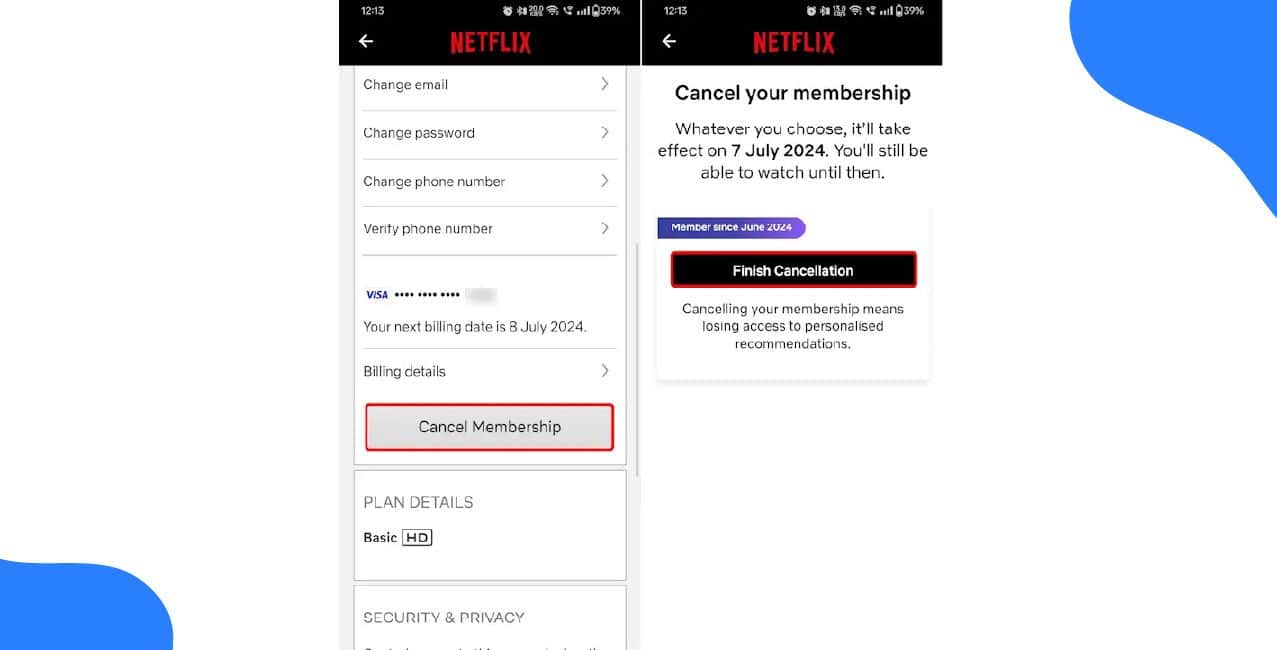
Dev’s priority is his academic progress. He realised that Netflix AutoPay was distracting him, so he decided to cancel it. He explains it in a short list of simple steps.
Steps to Cancel Netflix AutoPay:
As soon as you cancel AutoPay, the subscription is no longer active, and Dev won’t be billed after the current cycle. Netflix will still be available for him up to October 16th. Because of these savings, Dev can concentrate on learning and avoid losing time to distractions.
Read More - How to Stop Autopay in PhonePe
Dev is a college student who loves watching Netflix. But lately, he noticed he was spending too much time binge-watching shows instead of studying. He also wanted to save money for his textbooks. So, he decided to cancel his Netflix AutoPay.
Here are some common reasons why people cancel Netflix AutoPay:
Because of cancelling AutoPay, Dev was able to save while focusing on his exams. He can opt to get Netflix again whenever he wishes by signing up for it once more.
To prepare for exams, Dev stopped Netflix payments for the period. Let’s see how he managed to do this.
After cancelling:
Dev was pleased with what he decided to do. Saving money and having extra hours for his studies became possible. If he chooses to use Netflix again, all he has to do is start it up once more.
Dev ended his Netflix membership so he could use the money for studying. These are the changes we made:
For 2 weeks, Dev was still able to access the site. Once his payment cycle was finished, Netflix made him log out of his account. He left his account as a temporary place, just in case he ever went back.
Dev decided he wouldn’t miss the monthly fee, and after exams ended, he thought he might sign up again and watch more wisely.
Dev wanted a break from Netflix but wasn't ready to cancel completely. Here's how he paused his subscription:
*T&C Apply
Dev learned to control his Netflix usage and spending with these simple tips:
These changes helped Dev enjoy Netflix without overspending or wasting time. He now streams smarter, not harder.
Conclusion
The story of Dev on Netflix shows that minor improvements can have a big effect. He found success by first cancelling AutoPay, then later learning to pause his subscription and be more responsible about it. He figured out that he didn’t have to abandon Netflix to succeed on his tests or cut back on spending - with proper usage, he could get both jobs done.
Also Read – How to Deactivate a Paytm Account
Now, Dev doesn’t worry about missing his favourite shows, watches what he likes and doesn’t have to worry about additional costs. His money is now staying put, his school work is more successful, and he can always relax with Netflix whenever he likes. Dev’s experience shows that it isn’t hard to turn streaming services into something that fits your needs instead of you fitting the services.
1. How do I stop Netflix from charging me every month?
Log in to your Netflix account on a web browser, go to Account settings, and click "Cancel Membership." This stops all future payments while letting you watch until your current billing period ends.
2. Can I get my money back if I cancel Netflix?
No, Netflix doesn't refund unused days. You keep access until your next billing date, but won't get money back for the days you didn't use it.
3. What happens to my watchlist if I cancel?
Netflix saves your profiles, watch history and preferences for 10 months. If you restart within that time, everything returns exactly as you left it.
4. How can I take a break without fully cancelling?
Some accounts can "Pause Membership" for 1-3 months under Account settings. If unavailable, you'll need to cancel and restart later.
5. Why don't I see the pause option on my Netflix?
Not all accounts have this feature. Netflix sometimes tests it with certain users. If you can't find it, you'll need to cancel instead.
6. Can I still watch Netflix after cancelling?
Yes, but only until your next billing date. For example, if you cancel on June 10th with a June 20th renewal date, you can watch until June 20th.
7. How do I change my Netflix plan to save money?
Go to Account settings, click "Change Plan," and pick a cheaper option like Basic with Ads or Standard. Changes take effect at your next billing date.
8. Will Netflix notify me before restarting after a pause?
Yes, Netflix emails you 3 days before your pause period ends, giving you time to cancel or extend if needed.
9. Can I share my Netflix account to split costs?
Yes, Netflix allows adding "extra members" for a small fee. Check Account settings for sharing options in your country.
10. How do I stop binge-watching shows on Netflix?
Turn off autoplay in Account settings, set weekly time limits for yourself, or create a separate profile just for educational content.












