By continuing, you agree to LoansJagat's Credit Report Terms of Use, Terms and Conditions, Privacy Policy, and authorize contact via Call, SMS, Email, or WhatsApp
Disclaimer: The information published on LoansJagat is intended for general informational and educational purposes only and should not be considered financial, legal, or investment advice. Interest rates, loan terms, statistics, and other data may change over time and may vary by lender or source. Please verify the latest information and consult a qualified financial advisor or the respective Bank/NBFC before making any financial decisions.
Apply for Loans Fast and Hassle-Free
Subscribe Now
About the author

LoansJagat Team
‘Simplify Finance for Everyone.’ This is the common goal of our team, as we try to explain any topic with relatable examples. From personal to business finance, managing EMIs to becoming debt-free, we do extensive research on each and every parameter, so you don’t have to. Scroll up and have a look at what 15+ years of experience in the BFSI sector looks like.
Related Blog Post
Simplify All Your Loans Into One Affordable EMI

Customers Served

Debt Consolidated

1200+ Reviews

Locations in India
Club all Loans & Credit Card Bills into Single EMI

Quick Apply Loan
Consolidate your debts into one easy EMI.

Takes less than 2 minutes. No paperwork.

10 Lakhs+
Trusted Customers

2000 Cr+
Loans Disbursed

4.7/5
Google Reviews

50+
Banks & NBFCs Offers
Other services mentioned in this article
In today’s fast-click world, most people set up subscriptions in seconds but forget about them for months. That is why learning how to stop autopay in PhonePe is not just smart; it is essential. Whether you are in Delhi, Durgapur, or Dindigul, one small setting can help you save thousands every year. So buckle up, money-saving ninjas, because this blog is about to teach you how to cancel the sneaky, silent debit monsters hiding in your PhonePe account.
Key takeaways
How to Stop Autopay in PhonePe?
Imagine this: Rohit from Mumbai was vibing to his favourite playlist when his bank sent a message: ₹899 debited. Again. That was the third time this month. ₹899 for a premium fitness app he tried once and never used again. In three months, he lost ₹2,697 without even breaking a sweat. Ouch.
Welcome to the autopay jungle: convenient and fast, but if forgotten, it can drain your wallet!
"Apna paisa, apne haath; control lena hai toh smart bano saath!"
Digital wallets are revolutionising how Indians pay bills. From electricity to insurance, autopay makes sure nothing is missed. However, it can also lead to silent wallet-draining.
Read More - How to Cancel AutoPay on Netflix
Imagine Priya from Delhi signing up for a free trial of a fitness app. She forgets to cancel the subscription and ends up losing ₹499 every month. This continued for six months, totalling ₹2,994.
When people realise that such deductions are automatic, the common question becomes:
how to stop autopay in PhonePe?
Table: Common Autopay Services in PhonePe
"Paisa bachana hai toh digital samajhdaari zaroori hai!
Autopay is designed to be seamless. The payment gateway works quietly in the background, which can make users unaware of what has been charged. People often subscribe to services in trial mode, set up autopay during onboarding, and never return to cancel it.
According to a 2024 digital survey by a finance portal in India, 78% of respondents admitted that they were not aware of all the services for which autopay was enabled.
This makes understanding how to stop autopay in PhonePe a money-saving necessity.
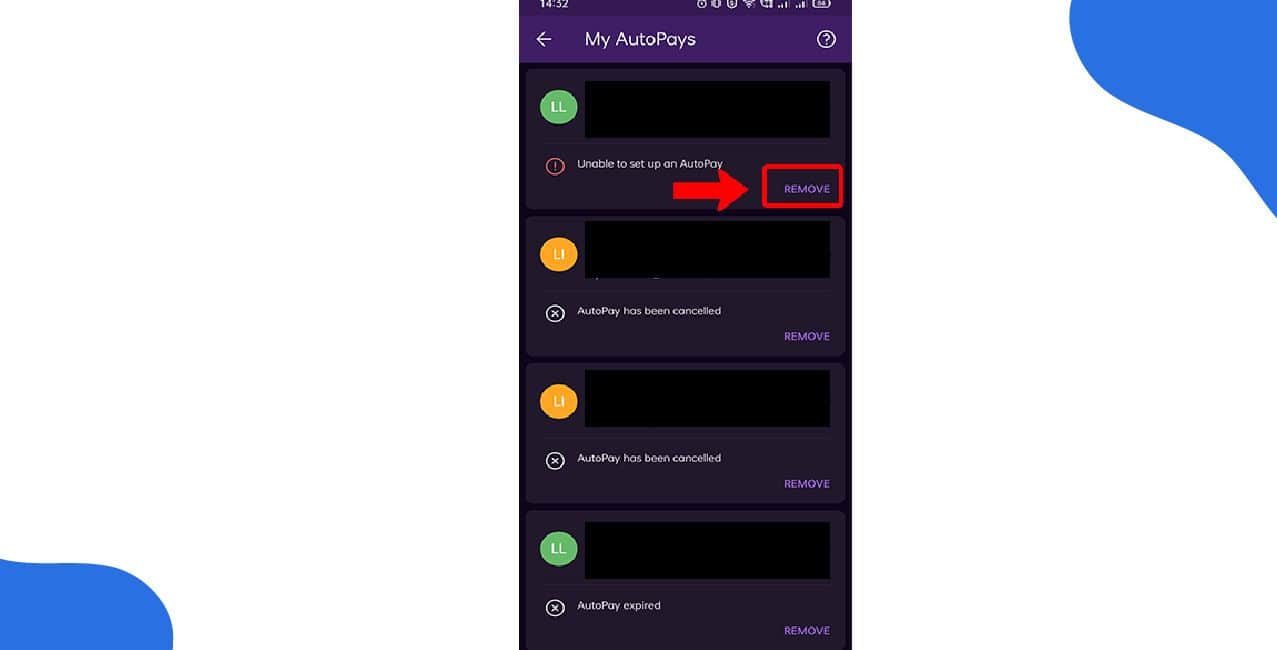
Step-by-Step Guide: How to Stop Autopay in PhonePe?
Stopping autopay in PhonePe is straightforward, but it's essential to follow each step carefully. Let us walk through the process.
Ensure the PhonePe app is installed and up to date. Open the application and log in with your credentials.
Step 2: Navigate to the “Auto Debit” Section
Step 3: Select the Active Mandate
Once completed, no future payments will be deducted automatically for that service.
"Pehle check karo, fir click karo, warna paisa gaya samjho!"
Example One: Manish from Bengaluru
Manish was charged ₹899 every month for a premium diet coaching app. When he checked his PhonePe app, he saw the autopay section listing the app as “active.” Once he cancelled it, his monthly budget saw an instant positive change. Over six months, he saved ₹5,394.
*T&C Apply
Example Two: Seema from Lucknow
Seema’s child had used her account to subscribe to a language learning app at ₹1,199 per month. She discovered it two months later and immediately stopped the autopay. Even though she lost ₹2,398, she learnt how to stop autopay in PhonePe the hard way and now checks her auto debit list monthly.
The Financial Maths Behind Autopay
If a person unknowingly pays ₹499 monthly for a service over one year, the annual total is:
₹499 × 12 = ₹5,988
Now imagine five such services running silently. That becomes:
₹5,988 × 5 = ₹29,940 annually
That is a decent smartphone or a domestic vacation. Understanding how to stop autopay in PhonePe can literally buy you memories instead of invisible charges.
Table: Estimated Yearly Spend from Common Autopay Subscriptions
Ek-ek rupaye ka hisaab rakho, tabhi khud ko samjho smart Indian grahak!"
Important Tips to Remember
Official Resources
For further assistance, you can visit the official PhonePe Help section on PhonePe Support.
To check which bank mandates are linked, visit the NPCI eMandate Portal.
Something to Remember
When life gives you subscriptions, do not let them become silent thieves. Be like Ramesh and Seema. Ask the critical question: how to stop autopay in PhonePe before it burns a hole in your pocket.
Stay sharp. Stay aware. And remember...
"Digital zamana hai, lekin paisa sambhal ke kharchna hai!"
Autopay is a brilliant convenience if monitored properly. But if ignored, it turns into a monthly leech. Most people do not realise they are bleeding money until their bank balance screams.
Also Read – How to Deactivate a Paytm Account
Learning how to stop autopay in PhonePe is like putting a lock on your digital wallet. Use this knowledge to empower yourself and become a savvy digital citizen. Take five minutes today, check your autopay list, and save thousands over the year.
So the next time you see an odd charge, do not panic. Open the app, cancel the mandate, and smile knowing your wallet is now safe.
Frequently Asked Questions (FAQs)
Will I be charged after cancelling autopay in PhonePe?
No, once you cancel the autopay mandate, no further payments will be deducted automatically. Ensure you receive a confirmation.
Yes, you can activate the same autopay again by visiting the service provider’s page on PhonePe and authorising it once more.
Yes, cancelling autopay might lead to service disruption if the subscription is not paid manually. Always check with the provider.
Contact PhonePe support via the PhonePe Help Centre and also raise a dispute with your bank if needed.
Go to the profile in your app, tap on settings, select Autopay, mandate or subscription.
Yes, you can cancel Autopay in Pay, but you first need to revoke any live mandates.
Open the app, go to your Profile, tap AutoPay under the 'Payment Management' section, and select your active Hotstar subscription. Then tap on remove autopay.
Open the app, go to your Profile, tap AutoPay under the 'Payment Management' section, and select your active Hotstar subscription. Then tap on remove autopay.
Edit an automatic payment within Internet Banking.












