By continuing, you agree to LoansJagat's Credit Report Terms of Use, Terms and Conditions, Privacy Policy, and authorize contact via Call, SMS, Email, or WhatsApp
Disclaimer: The information published on LoansJagat is intended for general informational and educational purposes only and should not be considered financial, legal, or investment advice. Interest rates, loan terms, statistics, and other data may change over time and may vary by lender or source. Please verify the latest information and consult a qualified financial advisor or the respective Bank/NBFC before making any financial decisions.
Subscribe Now
About the author

LoansJagat Team
‘Simplify Finance for Everyone.’ This is the common goal of our team, as we try to explain any topic with relatable examples. From personal to business finance, managing EMIs to becoming debt-free, we do extensive research on each and every parameter, so you don’t have to. Scroll up and have a look at what 15+ years of experience in the BFSI sector looks like.
Related Blog Post
Simplify All Your Loans Into One Affordable EMI

Customers Served

Debt Consolidated

1200+ Reviews

Locations in India
Club all Loans & Credit Card Bills into Single EMI

Quick Apply Loan
Consolidate your debts into one easy EMI.

Takes less than 2 minutes. No paperwork.

10 Lakhs+
Trusted Customers

2000 Cr+
Loans Disbursed

4.7/5
Google Reviews

20+
Banks & NBFCs Offers
Other services mentioned in this article
Key Takeaways
The HSBC Account Number is a unique 12-digit identifier that you use for every banking task, including transfers, payments, and online banking. The HSBC account number format stays the same for all customers, making it easy to recognise and use. You need these HSBC account number digits for both digital and branch transactions.
For example, my friend Priya opened an HSBC savings account, and her number is 123456789012. She uses it to log in to the mobile app, receive her salary, and send money to her family. During transfers, she also enters the HSBC IFSC code to route the funds correctly.
This blog also compares the HDFC Bank account number format, shows an HDFC Bank account number sample, and explains HDFC Bank account number check methods to help you understand the differences clearly.
You can find your HSBC Account Number easily through online banking, mobile banking, bank statements, or phone banking. These methods help you view your account details quickly and safely.
1. Online and Mobile Banking
Log in to the HSBC India mobile app or the online banking portal.
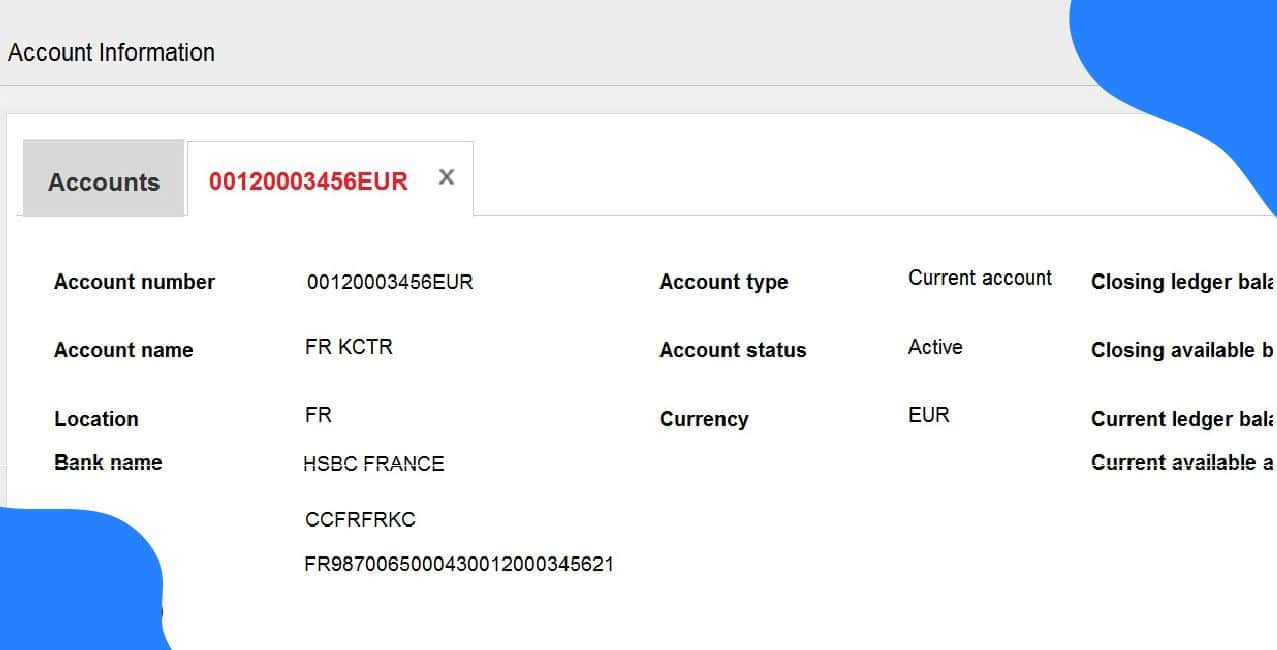
You can see your HSBC Account Number in the account summary or account details section. This is the fastest method. If you want to understand the format, you can also look at an HSBC Account Number Example shown in your account preview.
2. Bank Statements
Open any past paper statement or e-statement.
Your HSBC Account Number appears at the top of the statement or beside each transaction. If you use e-statements, you can download them easily from your online banking account and compare them with an HSBC Account Number Example to confirm the format.
3. Phone Banking
Call HSBC’s phone banking service and speak to a representative.
They will ask questions to verify your identity before sharing your account number. This is helpful when you cannot access your app or statements.
4. Other Options
You can find your HSBC Account Number through several easy methods, and choosing the quickest one helps you access your banking details without any hassle.
You use your HSBC account number for payments, online banking, mobile banking, and other essential banking services. Once you register for HSBC’s digital platforms, you can use your HSBC Account Number Digits to make transfers, view statements, and manage your account securely.
1. Online and Mobile Banking
2. Electronic Transfers (NEFT, RTGS, IMPS)
When sending money to an HSBC customer, you must enter the recipient’s account number and the bank’s IFSC code.
3. Phone Banking and Branch Services
You can use your HSBC account number for 24/7 phone banking to get help, check balances, or request services.
For in-person transactions, simply visit any HSBC branch and share your account number when asked.
Bonus Tip: When moving your salary account, consider setting up automatic transfers and linking your existing bill payments to HSBC Premier to avoid missed payments during the switch.
Keeping your HSBC Bank Account Number safe is important, and you can protect it by following a few simple security habits.
By staying cautious and following these steps, you can keep your HSBC Bank Account Number secure at all times.
*T&C Apply
HSBC uses a 12-digit account number format, and the bank asks you to enter it without the hyphen when filling out forms or making online transfers. This structure makes the number easy to read and helps HSBC identify your branch and account type quickly.
For example, if your HSBC account number is 123456789012, the bank reads it smoothly without any hyphens, following the standard HSBC 12-digit format.
Conclusion
Your HSBC Account Number is key to all banking activities, and by using it carefully and following security practices, you can manage your account safely and efficiently. Always keep your HSBC Account Number private and use secure channels for transactions to stay protected from fraud.
Q: How can I find my HSBC Account Number quickly?
A: You can find your HSBC Account Number by logging into the HSBC India mobile app or online banking portal, checking your bank statements, using your chequebook, or calling HSBC phone banking after verifying your identity.
Q: How do I get details from an account number?
A: You cannot get any personal or banking details from an account number. Banks treat this information as highly confidential, and they never share customer details with anyone.
Q: How can I set up HSBC online banking?
A: To set up HSBC online banking, gather your account number, ID, and registered email or mobile number. Register via the official website or mobile app, verify your identity, create login credentials, and activate multi-factor authentication. Finally, log in, add payees, and test basic functions. Contact HSBC support if you face any issues.
Q: Can I see my full HSBC credit card number before the card is delivered?
A: No, you cannot see your full HSBC credit card number before the physical card arrives. The HSBC app only shows the last four digits for security reasons. If a zero‑balance statement appears in your app, it may display the full card number, but it will still not show the CVV. You must wait for the card to be delivered to use the complete details.
Q: How can I move my salary account to HSBC Premier?
A: You need a net monthly income of ₹3 lakh. Contact HSBC via phone, app, or online form. If your employer has a corporate tie-up, it may help access Premier benefits, but it isn’t always required. Confirm with HR or HSBC before starting the transfer.












