By continuing, you agree to LoansJagat's Credit Report Terms of Use, Terms and Conditions, Privacy Policy, and authorize contact via Call, SMS, Email, or WhatsApp
Disclaimer: The information published on LoansJagat is intended for general informational and educational purposes only and should not be considered financial, legal, or investment advice. Interest rates, loan terms, statistics, and other data may change over time and may vary by lender or source. Please verify the latest information and consult a qualified financial advisor or the respective Bank/NBFC before making any financial decisions.
Apply for Loans Fast and Hassle-Free
Subscribe Now
About the author

LoansJagat Team
‘Simplify Finance for Everyone.’ This is the common goal of our team, as we try to explain any topic with relatable examples. From personal to business finance, managing EMIs to becoming debt-free, we do extensive research on each and every parameter, so you don’t have to. Scroll up and have a look at what 15+ years of experience in the BFSI sector looks like.
Related Blog Post
Simplify All Your Loans Into One Affordable EMI

Customers Served

Debt Consolidated

1200+ Reviews

Locations in India
Club all Loans & Credit Card Bills into Single EMI

Quick Apply Loan
Consolidate your debts into one easy EMI.

Takes less than 2 minutes. No paperwork.

10 Lakhs+
Trusted Customers

2000 Cr+
Loans Disbursed

4.7/5
Google Reviews

50+
Banks & NBFCs Offers
Other services mentioned in this article
Key Highlights
Do you still visit your SC Bank branch to make Standard Chartered Credit Card bill payment? Stop doing that and read this blog. We have discussed the various ways you can pay for your days while sitting at home.
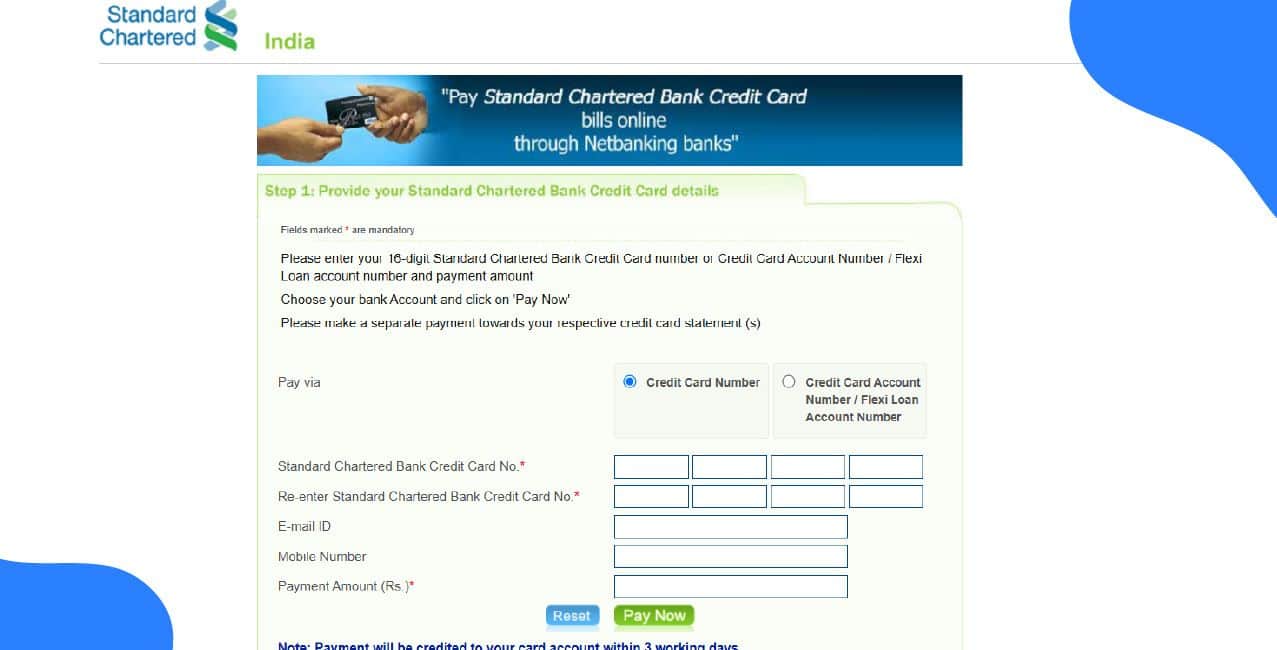
Standard Chartered Credit Card India offers online payment options and offline methods for paying credit card bills. On the Payment Option page, Standard Chartered lists Auto-debit, Cheque, Cash, and digital modes under “Other Payment Options.” Standard Chartered also provides a CardNet/BillDesk portal for credit card payments via the internet.
The “online methods” for paying Standard Chartered credit card bills include:
Though it does not support any app-based payment, these cover most use cases for digital (internet-based) payments. Also, the use of UPI is not mentioned on the official portal.
One of the common ways people like to make payments is through the website or the BillDesk portal. You can make the Standard Chartered credit card bill payment too, just follow these steps:
After payment, you should be shown a confirmation or transaction ID. Use that for your records.
After some time (depending on bank settlement), check that your credit card has been credited for that amount.
Standard Chartered Bank has the SC Mobile app. However, on the official page, it does not mention the use of the mobile app to make Standard Chartered credit card bill payments. Though you can use the net banking on the app. So, to know the steps, read the next section.
Standard Chartered allows certain interbank fund transfer methods, which can be used to pay credit card bills. Steps are:
Or
Download the SC Mobile app and log in.
Make sure to enter the correct card number and other details.
Standard Chartered Bank does not mention UPI as one of the methods to clear credit card bills on the official portal.
As part of the interbank transfer options, NEFT/RTGS/IMPS are viable ways. To make a Standard Chartered credit card bill payment, follow these steps:
RTGS is suitable for large amounts (above threshold) and has fixed service hours. NEFT is more flexible. This is general banking behaviour in India.
If you face any issues, you can always contact the Standard Chartered Credit Card customer service and call at
*T&C Apply
Here are the recommended best practices:
You can definitely continue paying your standard Chartered Credit card by cheque or cash. However, if you follow these tips and pay online, you will save a lot of time and effort
Conclusion
Standard Chartered offers web and branch payments. On top of that, you can use services like net banking and NEFT to make Standard Chartered credit card bill payments. Although it is not mentioned on the official site but you can also use the mobile app of SC to clear credit card bills.
How do I raise a dispute for an unauthorised charge?
Open Online Banking, then go to Help and Services, then Card Management, then Card Transaction Dispute. You can also call phone banking 24x7. The bank blocks the card and issues a reference number to track the case.
Can I convert past purchases into EMI, and what is the minimum amount to qualify?
Eligible spends can be converted to EMI from SC Mobile or Online Banking. Minimums and eligibility depend on card type and the specific offer. Check the app for transaction-level eligibility.
What is a balance transfer, and how long does it take to disburse?
Balance transfer moves outstanding balances to the card at a promotional rate. Approved transfers are typically disbursed by NEFT within three working days, subject to terms and approvals.
How can I request a credit limit increase?
Place a request in Online Banking under Help and Services, then Card Management, then Credit Limit Increase. The bank reviews income account behaviour and eligibility before deciding.
How is interest charged on overdue amounts, and where do I find the rate?
Interest is shown as monthly and annual rates in your card terms and billing statement. Your card-specific terms include examples and the APR calculation. Check your statement or the card terms for exact numbers.
How do I replace a lost or stolen card and track the replacement?
Report loss in Online Banking or via SC Mobile. The bank blocks the card and arranges a replacement. You can track replacement status in Help and Services.
If I pay before the due date via BillDesk or other channels, but the payment isn’t reflected in SCB’s system before due date, will it be marked late?
Yes, this can happen. Users have reported paying via BillDesk well before due date, getting confirmation, but SCB reporting late payment or marking as delayed to credit bureaus. To avoid this, make payments a few days ahead of the due date (allow for bank processing delays) and keep transaction receipts.
Other Related Pages | |||