By continuing, you agree to LoansJagat's Credit Report Terms of Use, Terms and Conditions, Privacy Policy, and authorize contact via Call, SMS, Email, or WhatsApp
Disclaimer: The information published on LoansJagat is intended for general informational and educational purposes only and should not be considered financial, legal, or investment advice. Interest rates, loan terms, statistics, and other data may change over time and may vary by lender or source. Please verify the latest information and consult a qualified financial advisor or the respective Bank/NBFC before making any financial decisions.
Subscribe Now
About the author

Arshathul Afia
Arshathul Afia is a journalism graduate and fintech content writer with 4+ years of experience in digital publishing and research-led writing. She has written 200+ articles covering personal finance, lending, banking, digital payments, credit, insurance, and major financial developments in India. At LoansJagat, she focuses on simplifying complex fintech news, RBI updates, loan-related changes, policy developments, and industry trends for everyday readers. Her journalism background helps her approach stories with research, context, and clarity, while her SEO experience ensures content remains discoverable and relevant. She aims to make financial news easier to understand, practical, and useful for readers across India.
Related Blog Post
Simplify All Your Loans Into One Affordable EMI

Customers Served

Debt Consolidated

1200+ Reviews

Locations in India
Club all Loans & Credit Card Bills into Single EMI

Quick Apply Loan
Consolidate your debts into one easy EMI.

Takes less than 2 minutes. No paperwork.

10 Lakhs+
Trusted Customers

2000 Cr+
Loans Disbursed

4.7/5
Google Reviews

50+
Banks & NBFCs Offers
Other services mentioned in this article
Many companies now provide online portals to make business work faster and easier. HPCL also offers one for its business partners. This guide explains the HPCL Business Portal, its online services, login process, and other important details you should know.
HPCL's business partners can use these tools to better manage their operations, remain informed of crucial updates, and focus on growth and customer satisfaction.
The HPCL Business Portal is meant for authorized business partners of HPCL. This includes dealers, distributors, vendors, transporters, and other registered partners working with the company. Regular customers cannot use this portal. Users need valid login credentials provided by HPCL to access its services and business-related information.
The HPCL Business Portal offers several online services for business partners, including:
Transaction Tracking: Users can see their transactions in real-time, ensuring transparency and timely updates.
Payment Updates: The interface delivers real-time payment notifications, allowing partners to better manage their funds.
Read More – ICICI HPCL Super Saver Credit Card
Sales History: There are complete records of previous sales available, facilitating improved analysis and strategic planning.
Invoice and Statement Downloads: Partners may easily access invoices and statements, eliminating paperwork and administrative responsibilities.
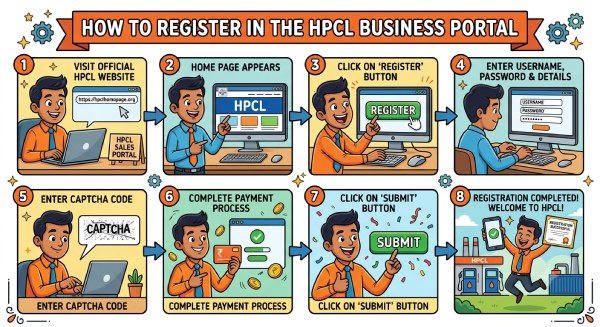
You can complete the registration through the HPCL Sales Portal by following these steps.
Step 1: The first thing you should do is visit the official website.
Step 2: Now the home page will appear on your screen.
Step 3: Now you will have to click on the given register button.
Step 4: Now enter your username and password and other details.
Step 5: You will have to enter the Captcha code given below.
Step 6: After this, complete the payment process.
Step 7: You will have to click on the submit button given below.
Step 8: Now your registration is completed.
Follow the steps below for a successful HPCL Business Portal Login.
Step 1: Visit the official website of the HPCL Business Portal.
Step 2: On the right side, you will find the option to log in.
Step 3: You will be asked to enter Customer ID, Password and captcha.
Step 4: Click on the Login button. You will be able to avail of the services once you log into the account.
Applicants wishing to download the HPCL Business App should follow the steps outlined below.
Step 1: You'll need to go to the Play Store on your phone.
Step 2: The main page will now open.
Step 3: After that, click on the search option.
Step 4: Once you enter the app's name.
Step 5: Now, click on the search button.
Step 6: You will now have to choose an app.
Step 7: After that, click the Download option.
Step 8: At this point, the app will successfully download.
Here is the step-by-step guide to changing your password:
Step 1: First visit the website of HPCL Business Portal.
Step 2: Click on this Link and you will be redirected to a new page to change your password.
Step 3: On this page, you will be asked to fill in the credentials.
Step 4: You will have to enter your Customer ID, old password, new password, and confirm password.
Step 5: Click on submit. You also have the option to reset it or can also go back.
Time and Effort Savings: By offering a centralised platform for managing all elements of their relationship with HPCL, the portal eliminates the need for laborious paperwork and in-person visits, saving them time and effort. The HPCL Sales Portal also helps dealers and distributors manage their business more efficiently.
Enhanced Efficiency: The portal automates processes, which reduces manual intervention and the possibility of errors, resulting in more efficient operations.
Real-Time Information Access: Businesses that have real-time access to pertinent information can make informed decisions and optimise their operations more effectively.
1. Procurement and Supply Chain Management: The site facilitates procurement by providing a centralised platform for placing and tracking orders. Businesses may monitor supply chain operations in real-time to ensure effective inventory management.
2. Vendor and Distributor Management: The site allows distributors and vendors to streamline their communications with HPCL. It enables them to manage contracts, submit invoices, and accept payments as instructed.
3. Transporter Collaboration: Transporters may monitor fuel shipments, optimise delivery routes, and assure timely distribution. This reduces delays and increases supply chain reliability.
4. Performance Monitoring: Businesses can utilise reporting systems to analyse performance metrics, identify areas for improvement, and establish strategic objectives.
For help with the HPCL Business Portal, you can contact the following people:
LPG Division:
Retail Division:
Aviation Division:
General Queries:
Naphtha:
Solvents:
Marine/Bunker:
International Operations:
Bitumen/Asphalt:
Lubricants:
For more detailed contact information, you can visit the HPCL Business Portal's contact page.
Keep your profile information up to date: To avoid disruptions, keep your business information on the portal up to current at all times.
Also Read - BOB HPCL Credit Card
Utilise Training Resources: HPCL provides training materials to help users make the best use of the site. Use these materials to improve your abilities.
Frequently monitor reports: Use the reporting tools to monitor your company's success and make data-driven decisions.
Engage with support: If you run into any problems, please contact HPCL's support team for help.
Take a proactive approach: Stay ahead of the curve by regularly investigating new features and functionalities as they emerge.
The HPCL Business Portal is a platform designed to streamline and improve the interactions between Hindustan Petroleum Corporation Limited (HPCL) and its business partners, including dealers and distributors. A successful HPCL Business Portal Login gives business partners quick access to all portal services.
By offering features such as real-time transaction tracking, instant payment updates, detailed sales history, and easy access to invoices and statements, the portal significantly reduces manual paperwork and administrative tasks.
This centralised system not only saves time and effort but also provides users with the tools needed to make informed decisions, ultimately contributing to improved and more effective business operations.
The website Sales.hpcl.co.in hosts the HPCL Business Portal, which contains all business information relevant to sales possibilities. HPCL Dealers can access the HPCL Portal to view transactions, payments, and sales history and download invoices and statements.
Under the name HP Buddy, the HPCL Business Portal App is accessible on the Google Play Store and APP Store. It is simple to download and use; if you encounter any problems, refer to this post.
If you are a citizen looking to apply online for a dealership, please follow the processes outlined below.
The first thing you should do is visit the official website. Now the home page will appear on your screen. You will have to click on the given register button. Now enter your username and password and other details. You will have to enter the captcha code given below. After this complete the payment process. You will have to click on the submit button given below. Now your registration is successfully completed.
HPCL is a government-owned company. It is a Navratna PSU under the Ministry of Petroleum.
The current CEO and Chairman of HPCL is Sandeep Kumar Gupta as of 2026.
Explore Other Portals