By continuing, you agree to LoansJagat's Credit Report Terms of Use, Terms and Conditions, Privacy Policy, and authorize contact via Call, SMS, Email, or WhatsApp
Disclaimer: The information published on LoansJagat is intended for general informational and educational purposes only and should not be considered financial, legal, or investment advice. Interest rates, loan terms, statistics, and other data may change over time and may vary by lender or source. Please verify the latest information and consult a qualified financial advisor or the respective Bank/NBFC before making any financial decisions.
Subscribe Now
About the author

LoansJagat Team
‘Simplify Finance for Everyone.’ This is the common goal of our team, as we try to explain any topic with relatable examples. From personal to business finance, managing EMIs to becoming debt-free, we do extensive research on each and every parameter, so you don’t have to. Scroll up and have a look at what 15+ years of experience in the BFSI sector looks like.
Related Blog Post
Simplify All Your Loans Into One Affordable EMI

Customers Served

Debt Consolidated

1200+ Reviews

Locations in India
Club all Loans & Credit Card Bills into Single EMI

Quick Apply Loan
Consolidate your debts into one easy EMI.

Takes less than 2 minutes. No paperwork.

10 Lakhs+
Trusted Customers

2000 Cr+
Loans Disbursed

4.7/5
Google Reviews

50+
Banks & NBFCs Offers
Other services mentioned in this article
Key Takeaways
If remembering too many login details stresses you out, Indian Bank has solved that problem for good. One Indian Bank Customer ID handles every savings, FD, and digital service you use.
The Indian Bank Customer ID is a unique number that identifies you as a customer across all your accounts and services. It helps you access digital banking and manage your finances smoothly.
For example, when I opened my savings account, the bank gave me one Customer ID that linked my savings account, fixed deposit, and mobile banking. I used this single number to register for net banking and view all my accounts in one place without any confusion.
Now that you know what the Customer ID is, let us look at how it works and why it is important in everyday banking.
Before stressing about a missing Customer ID, check these obvious spots, Indian Bank makes it almost impossible to miss. You’ll find it faster than you expect.
Read More – Punjab National Bank Customer ID
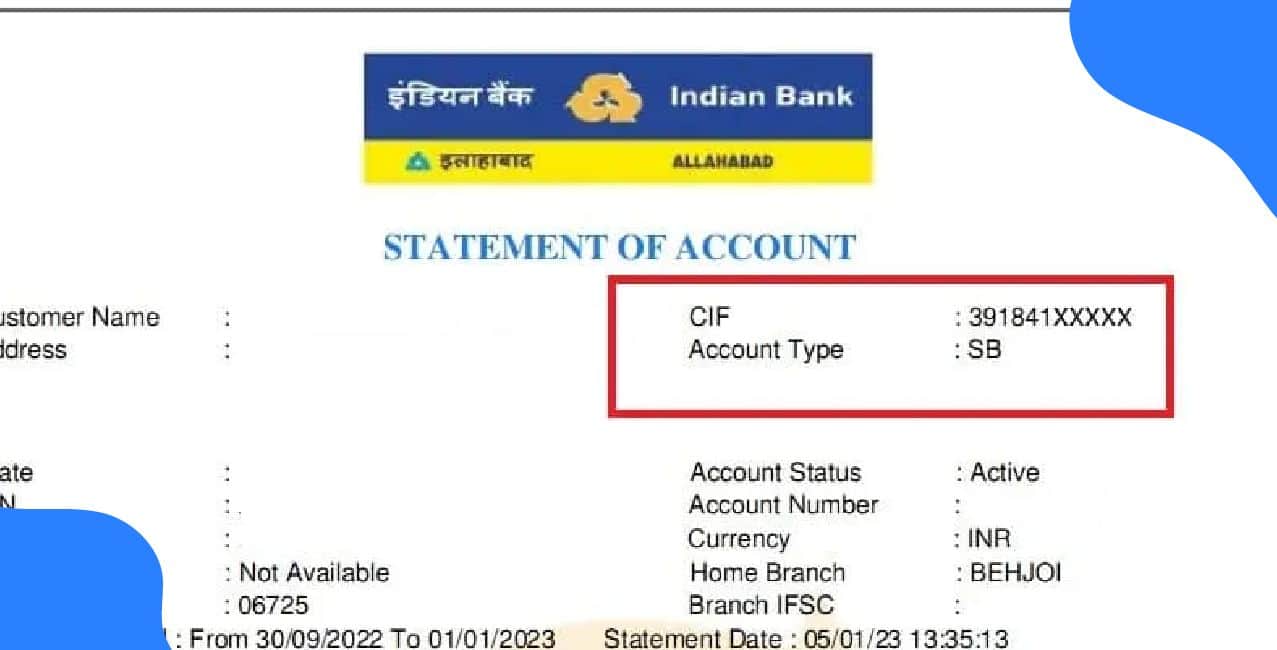
You can find your Indian Bank Customer ID easily through several places and methods. First, check your passbook, chequebook, or account statement; the 11-digit Indian Bank Customer ID is usually printed there.
You can also log in to the Indian Bank net banking portal or mobile app and view it under your account details. If you still cannot locate it, you can contact customer care, and they will help you retrieve your Indian Bank Customer ID safely.
You use your Indian Bank Customer ID number 24×7 to register for Indian Bank Net Banking and set up your online access. This number, also called the CIF number, helps you complete the first-time registration process.
Important points to note:-
Your Indian Bank Customer ID number 24×7 helps you set up secure online banking and gives you smooth access to all digital services whenever you need them.
You have to understand the difference between an Indian Bank Customer ID number and an account number. It helps you manage your banking services more clearly. Below is a table to understand you better.
*T&C Apply
It is important to know your Indian Bank Customer ID because it helps you access banking services smoothly and securely. It acts as a single identifier that connects all your accounts and makes digital banking easier.
1. Easy access to online and mobile banking
You use your Customer ID to log in to Indian Bank’s internet and mobile banking platforms.
2. Smooth account management
It helps you check balances, view your transactions, and manage fund transfers without any difficulty.
3. Quick activation of digital services
Your Customer ID is needed to activate and use services like bill payments, tax payments, and online bookings.
4. One ID for all accounts
It links all your accounts under one number, making it simple to manage multiple accounts.
5. Faster customer support
If you share your Customer ID, it helps the bank quickly to find your details and resolve your queries.
6. Access to additional services
You need it for services such as applying for loans, updating KYC, and managing cheque books.
Your Indian Bank Customer ID gives you quick access to key banking services and helps you manage all your accounts with ease and security.
Bonus Tip: Do not click on links from unknown emails or messages. Also, avoid using public Wi-Fi when you access your online banking or handle financial transactions.
Your Indian Bank Customer ID plays a central role in your banking experience because it identifies you across all your accounts and services.
It helps you register for digital banking, manage your money securely, access multiple services with one number, and receive quick support whenever you need it. By keeping this ID safe and accessible, you make your banking smoother, faster, and more reliable.
Also Read – Central Bank of India Customer ID
What is the User ID for Indian Bank Net Banking?
Your default User ID for Indian Bank Net Banking is your CIF number, which you can find in your passbook. You may also visit your branch and ask for your CIF number if you are setting up net banking or mobile banking. After you complete your registration on the Net Banking website, you can change your User ID to something you prefer.
How do I determine the Customer ID for net banking?
You can find your Customer ID in your welcome kit, passbook, cheque book, or account statement. Banks also send it in first-time net banking emails or SMS. You can check it in your mobile app under Profile or Account Details, or recover it through the “Forgot User ID” option on the bank’s website.
Can I recover my Customer ID without visiting the branch?
Yes, you can recover your Customer ID without visiting the branch by using options like “Forgot User ID” on the bank’s website, checking your mobile banking app, or referring to your passbook, cheque book, or account statement.
Other Related Pages | ||












