By continuing, you agree to LoansJagat's Credit Report Terms of Use, Terms and Conditions, Privacy Policy, and authorize contact via Call, SMS, Email, or WhatsApp
Disclaimer: The information published on LoansJagat is intended for general informational and educational purposes only and should not be considered financial, legal, or investment advice. Interest rates, loan terms, statistics, and other data may change over time and may vary by lender or source. Please verify the latest information and consult a qualified financial advisor or the respective Bank/NBFC before making any financial decisions.
Subscribe Now
About the author

LoansJagat Team
‘Simplify Finance for Everyone.’ This is the common goal of our team, as we try to explain any topic with relatable examples. From personal to business finance, managing EMIs to becoming debt-free, we do extensive research on each and every parameter, so you don’t have to. Scroll up and have a look at what 15+ years of experience in the BFSI sector looks like.
Related Blog Post
Simplify All Your Loans Into One Affordable EMI

Customers Served

Debt Consolidated

1200+ Reviews

Locations in India
Club all Loans & Credit Card Bills into Single EMI

Quick Apply Loan
Consolidate your debts into one easy EMI.

Takes less than 2 minutes. No paperwork.

10 Lakhs+
Trusted Customers

2000 Cr+
Loans Disbursed

4.7/5
Google Reviews

50+
Banks & NBFCs Offers
Other services mentioned in this article
Key Takeaways
Bonus Point: Before Diwali 2023, a big technical problem in UCO Bank’s IMPS system accidentally sent ₹820 crore to some customers. The bank has reported this mistake to the police for further investigation and action.
Handling a high-value payment can feel stressful, especially when you want it to reach instantly and securely. The UCO Bank RTGS form makes this entire process simple, clear, and smooth for anyone transferring large amounts of money.
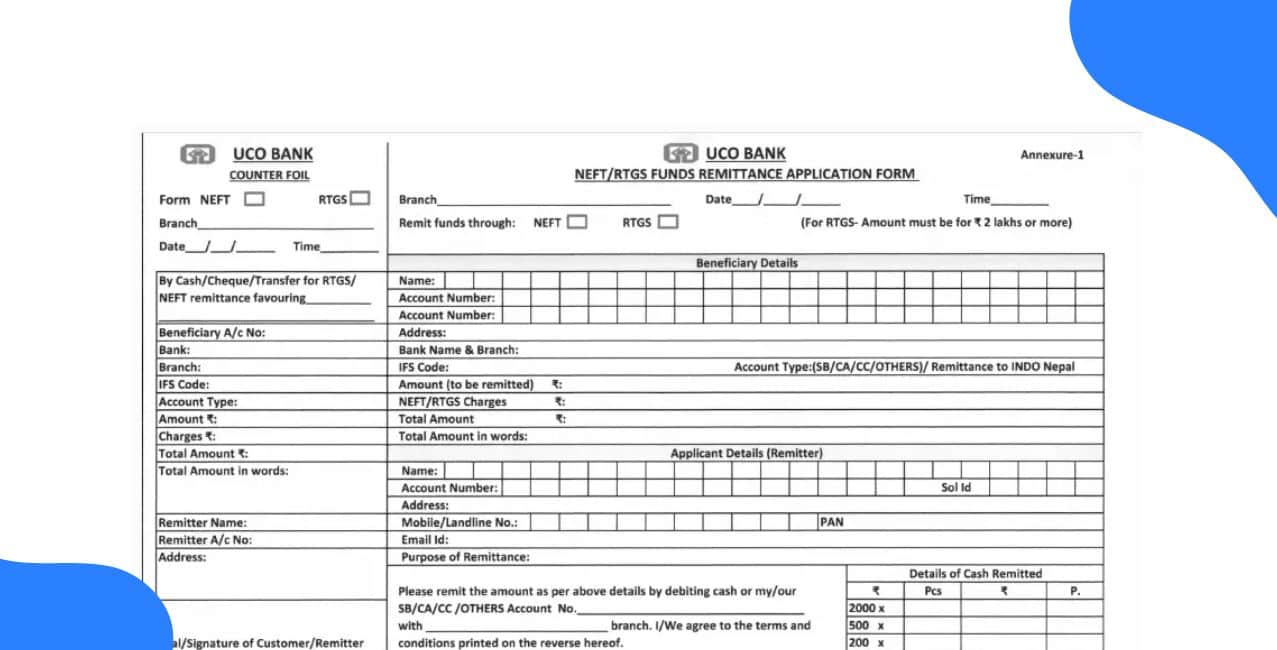
The UCO Bank RTGS form is a paper-based document used to initiate Real-Time Gross Settlement transfers, where money moves immediately and safely. Think of it like booking a VIP lane for your funds, no waiting lines, no detours, just a direct and priority route to the receiver’s account.
Recently, I had to send a high-value amount urgently, and using the UCO Bank RTGS form made everything surprisingly easy. I filled in the beneficiary details, handed it over at the branch, and the money reached the recipient almost instantly without any confusion or delay.
The UCO Bank RTGS form is used to initiate high-value fund transfers through the Real-Time Gross Settlement (RTGS) system. It serves as both an application and a payment order, requiring details of the sender and beneficiary, such as names, account numbers, bank names, and IFSC codes. The form is easily available in both English and Hindi for customer convenience.
If you wish to make an offline RTGS transaction through UCO Bank, you can easily download the RTGS form by following these simple steps.
After completing these steps, the UCO Bank RTGS form will be saved on your device, ready to be printed and filled out for your fund transfer.
Here’s a simple guide to fill out the UCO Bank RTGS (Real-Time Gross Settlement) form correctly.
Sender details
Beneficiary details
Transaction details
Final steps
By following these steps and verifying every field, your RTGS request will be processed smoothly, and you’ll have a proper record for future reference.
To complete an RTGS transaction at UCO Bank, you don’t need to submit any physical documents, but you must provide accurate details for a smooth fund transfer.
By providing all these details correctly, your UCO Bank RTGS transaction will be processed quickly, securely, and without any delay.
UCO Bank allows customers to make RTGS transactions easily through both branch and digital modes. While inward RTGS remittances are completely free, outward transactions attract nominal charges based on the transfer amount and mode of payment.
*T&C Apply
These minimal RTGS charges make fund transfers through UCO Bank both affordable and convenient, whether you choose to transact digitally or at the branch.
UCO Bank provides seamless RTGS and NEFT facilities that allow customers to transfer funds securely and instantly at any time, ensuring convenience for both individuals and businesses.
RTGS Timings
NEFT Timings
NEFT Batch Settlement Timings
With round-the-clock RTGS and NEFT availability, UCO Bank ensures customers can make instant money transfers anytime, including weekends and holidays, enhancing flexibility and banking convenience.
The UCO Bank RTGS form provides a reliable and convenient way to transfer large sums securely across banks. With easy download options, simple form-filling steps, minimal charges, and 24x7 availability, customers can enjoy fast and hassle-free fund transfers. Whether done digitally or at a branch, UCO Bank ensures efficiency, transparency, and complete customer satisfaction in every RTGS transaction.
Q1: How can I do RTGS through the bank without a cheque and get the amount debited directly from my account?
Simply visit your bank branch, fill out the RTGS form, authorise account debit, and the bank will process the transfer without needing a cheque.
Q2: What should we fill in the “Remitter Bank’s RTGS/NEFT Code” column?
A: You need to enter your bank branch’s IFSC code, as it serves as the RTGS/NEFT code for the remitter.
Q3: I did NEFT from UCO Bank, IFSC, and the name is correct, but 2 digits of the beneficiary account number are wrong. The amount is debited. What happens now?
The transaction will fail or credit a non-existent account, and the bank will automatically reverse the amount after verification.
Q4: Does RTGS/NEFT verify the beneficiary’s name along with IFSC and account number?
No, RTGS/NEFT mainly verifies the account number and IFSC; the beneficiary name is usually not matched during processing.
Q: What should I do if my bank is still charging me for RTGS/NEFT?
Contact your branch, request updated charges, and ask for a correction if RTGS/NEFT is supposed to be free as per current rules.
Other Related Pages | |||












