By continuing, you agree to LoansJagat's Credit Report Terms of Use, Terms and Conditions, Privacy Policy, and authorize contact via Call, SMS, Email, or WhatsApp
Disclaimer: The information published on LoansJagat is intended for general informational and educational purposes only and should not be considered financial, legal, or investment advice. Interest rates, loan terms, statistics, and other data may change over time and may vary by lender or source. Please verify the latest information and consult a qualified financial advisor or the respective Bank/NBFC before making any financial decisions.
Subscribe Now
About the author

Diwaker Sharma
Diwaker Sharma is a finance content specialist with expertise in banking, personal finance, credit cards, loans, fintech, and financial news. An MBA in Finance with prior experience in the banking sector, he combines industry knowledge with SEO and content strategy to produce insightful, research-backed articles. Passionate about making finance accessible, he transforms complex financial concepts into clear, engaging content that empowers readers to make smarter financial decisions with confidence.
Related Blog Post
Simplify All Your Loans Into One Affordable EMI

Customers Served

Debt Consolidated

1200+ Reviews

Locations in India
Club all Loans & Credit Card Bills into Single EMI

Quick Apply Loan
Consolidate your debts into one easy EMI.

Takes less than 2 minutes. No paperwork.

10 Lakhs+
Trusted Customers

2000 Cr+
Loans Disbursed

4.7/5
Google Reviews

50+
Banks & NBFCs Offers
Other services mentioned in this article
You can knock out your LIC premium payment right on LIC's official website, either through “Pay Direct” without logging in at all, or through the Customer Portal if you're already registered. Credit Card, Debit Card, Net Banking, UPI, all work, and you've got a window of up to 30 days before your due date.
Got an LIC policy running? Sooner or later that renewal premium comes due, and paying it online means skipping the whole trip to a branch or chasing down your agent. This one's for LIC policyholders across India who just want the actual process for paying digitally, whether you've already got a Customer Portal account or you'd rather not bother registering at all. We'll walk through both routes, which policies actually qualify, what payment modes work, and what to do if a transaction doesn't go through cleanly.
Use "Pay Direct," punch in your policy number and a few basic details right on LIC's site, no login needed at all.
Here you can learn how to pay LIC Premium Online and how it works, per LIC's official page:
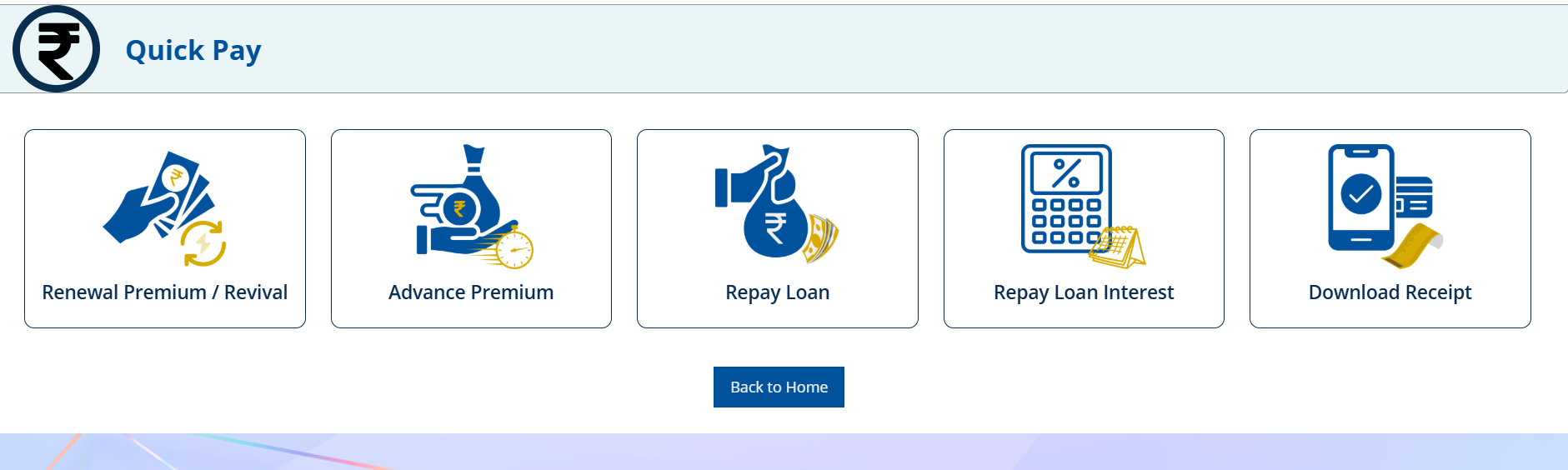
Works whether you're registered or not, which makes it the faster pick if you just need to knock out one premium payment without bothering with a full portal account.
Log in with your User ID and password, then pick your policy from what's already saved to your profile.
Here's how it plays out:
The Customer Portal really earns its keep if you're juggling several policies, since it holds onto your entire payment history and receipts in one spot, no re-entering details each time.
Ordinary in-force policies and anything eligible for spot revival qualify, across Yearly, Half-Yearly, Quarterly, and Monthly-Ordinary modes.
As per LIC's official FAQ page, this doesn't extend to Health Insurance policies or anything under the Salary Savings Scheme. NACH mode premiums are largely off the table too, with one exception, if your last NACH attempt bounced and the mandate's still pending, you can step in and pay online to cover that gap. There's also some breathing room on timing, you can pay up to 30 days ahead of your actual due date if you'd rather get it out of the way early.
Credit Card, Debit Card, Net Banking, and UPI all work, and credit card users don't even pay the convenience fee themselves.
Breaking this down, per LIC's official terms:
One catch though, repaying a policy loan or its interest specifically means skipping credit card entirely, per LIC's own page, any other mode works fine for that.
Pay Direct's built for a quick, one-off payment. The Customer Portal makes more sense if you're managing multiple policies and want your payment history sitting somewhere accessible.
*T&C Apply
Suresh runs a shop in Nagpur, 42 years old, and needs to clear his quarterly LIC premium of ₹8,500, but he's never bothered setting up a Customer Portal account. He goes to LIC's site, picks “Pay Premium,” then “Choose renewal premium, fills in all details, then pay your policy premium without logging in (Without login). Fills in his policy number, date of birth, mobile number, email, and pays through UPI. Minutes later, an e-receipt shows up in his inbox confirming everything went through. Around the same time, he's also looking into a personal loan, so he checks something like LoansJagat to compare a few options, pulling his LIC policy details in as part of the broader paperwork his lender wants.
Once you know which route actually fits your situation, paying LIC premiums online gets pretty simple, Pay Direct for something fast, the Customer Portal if you're keeping tabs on several policies. Stick to the accepted payment modes, double check your policy type actually qualifies, and keep an eye on your inbox for that receipt once things clear. A few minutes online, and that's one less trip to a branch every renewal cycle.