By continuing, you agree to LoansJagat's Credit Report Terms of Use, Terms and Conditions, Privacy Policy, and authorize contact via Call, SMS, Email, or WhatsApp
Disclaimer: The information published on LoansJagat is intended for general informational and educational purposes only and should not be considered financial, legal, or investment advice. Interest rates, loan terms, statistics, and other data may change over time and may vary by lender or source. Please verify the latest information and consult a qualified financial advisor or the respective Bank/NBFC before making any financial decisions.
Apply for Loans Fast and Hassle-Free
Subscribe Now
About the author

LoansJagat Team
‘Simplify Finance for Everyone.’ This is the common goal of our team, as we try to explain any topic with relatable examples. From personal to business finance, managing EMIs to becoming debt-free, we do extensive research on each and every parameter, so you don’t have to. Scroll up and have a look at what 15+ years of experience in the BFSI sector looks like.
Related Blog Post
Simplify All Your Loans Into One Affordable EMI

Customers Served

Debt Consolidated

1200+ Reviews

Locations in India
Club all Loans & Credit Card Bills into Single EMI

Quick Apply Loan
Consolidate your debts into one easy EMI.

Takes less than 2 minutes. No paperwork.

10 Lakhs+
Trusted Customers

2000 Cr+
Loans Disbursed

4.7/5
Google Reviews

50+
Banks & NBFCs Offers
Other services mentioned in this article
Key Takeaways
Have you ever struggled with bank transfer forms? Many people find financial paperwork quite confusing and overwhelming.
My friend Shivam, a young college student who needed to send ₹43,000 home urgently. He visited his local UCO Bank branch feeling nervous and unsure. The staff helped him understand the NEFT form step by step. Within minutes, Shivam completed his first transfer of ₹43,000 successfully!
His confusion turned into confidence that day. This blog will guide you through the UCO Bank NEFT form process. Let's make your banking experience as smooth as Shivam's journey.
Have you heard about transferring money between banks? It's quite simple nowadays. The UCO Bank NEFT form helps you send money electronically. You can use the UCO Bank NEFT form online easily.
Many customers prefer the UCO Bank NEFT form PDF option. It makes banking faster and more convenient. Do you want to transfer funds quickly? This form is your perfect solution. It's safe and reliable for all transactions.
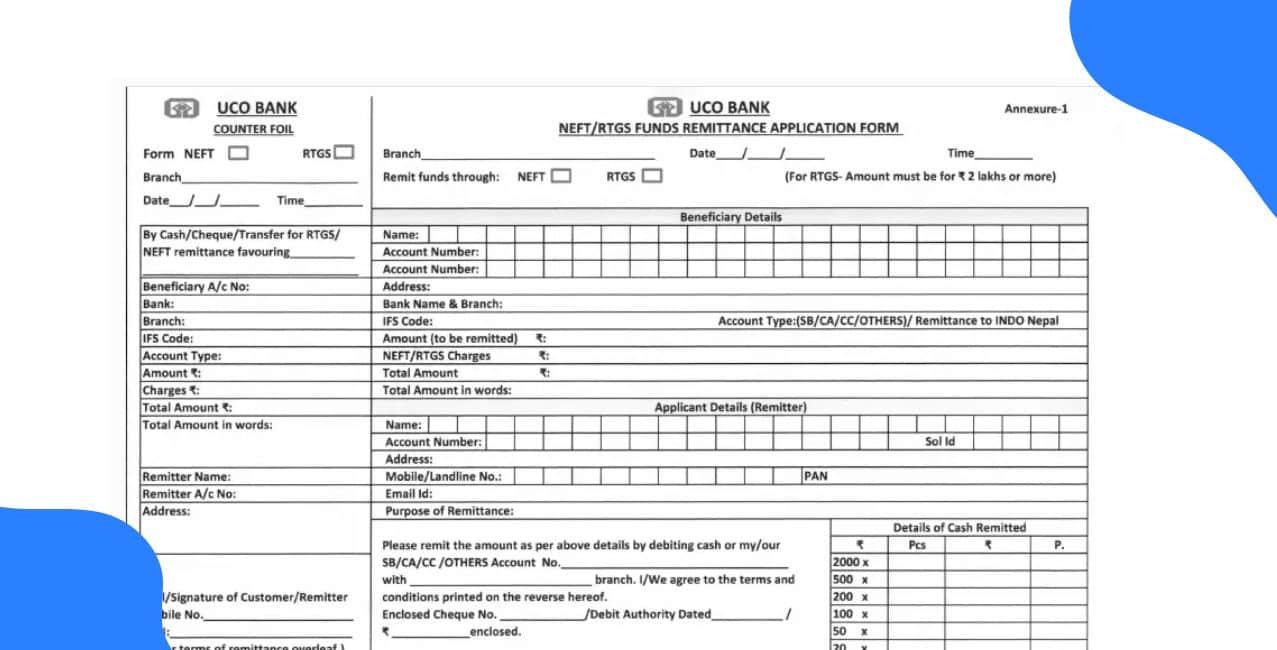
Want to download the UCO Bank NEFT form quickly? Let’s look at this simple guide to help you through it.
The UCO Bank NEFT form PDF will start downloading instantly. Isn't that simple and convenient?
Ever wondered how to fill out the UCO Bank NEFT form correctly? Don't worry, it's quite straightforward. Let's walk through each step together.
Fill details of Applicant (Remitter)
Fill details of Beneficiary (Receiver)
Fill remittance Details
Sign at the bottom to complete the UCO Bank NEFT form online. Have you got all the details ready? Let's double-check before submitting!
Did you know that filling out the UCO Bank NEFT form requires some documents? Let's see what we need to gather.
Have you got all these ready? The UCO Bank NEFT form PDF requires accurate information. Keep all documents organised before visiting the branch.
Have you ever wondered about the charges for NEFT transactions? Let's explore what UCO Bank charges for NEFT. The UCO Bank official website mentions various service charges clearly. The UCO Bank NEFT Charges structure is:
*T&C Apply
Important Note: There are no charges for net banking or mobile banking. Isn't that great news for savings account holders? The UCO Bank NEFT form PDF displays all charge details. You should check the latest charges on their official website.
The UCO Bank NEFT form can be submitted anytime now. You can easily use NEFT 24*7 using online methods. Yes, that includes Sundays and holidays too! However, if you prefer an offline method, then you have to follow bank timings which are 10 AM to 4 PM, Monday to Friday.
So, have we covered everything about the UCO Bank NEFT form? We've learnt how to download and fill it properly. The UCO Bank NEFT form online makes transfers incredibly simple. You can access the UCO Bank NEFT form PDF anytime.
Remember to keep all required documents ready beforehand. The charges are quite reasonable for different transaction amounts. NEFT works round the clock for our convenience. Isn't it amazing how easy banking has become? Now you're ready to make your first NEFT transfer.
Bonus Tip: Do you know? UCO Bank ranked 3rd among public sector banks for driving India’s digital payments and innovation push in FY2024–25.
1. How can I download the UCO Bank NEFT form PDF?
Visit the UCO Bank official website and click on 'Download Application Forms'. Then select the NEFT Application Form to download it instantly.
2. How to fill the UCO Bank NEFT form step by step?
Fill in your account details, and add beneficiary information with the IFSC code. Write the transfer amount and sign at the bottom.
3. Can I submit the UCO Bank NEFT form online?
Yes, you can submit the UCO Bank NEFT form online. Use net banking or mobile banking for digital submissions anytime.
4. What are the NEFT charges in UCO Bank?
Charges range from ₹2.50 to ₹25 plus GST based on the amount. Net banking and mobile banking transactions are completely free, though.
5. What documents are required for UCO Bank NEFT transfer?
You need a valid ID proof, PAN or Aadhaar card, beneficiary's details. Keep the account number and IFSC code ready too.
6. What are the NEFT timings in UCO Bank?
NEFT services operate 24x7 throughout the week in UCO Bank. This includes all Sundays and public holidays as well.
7. What is the difference between UCO Bank NEFT and RTGS forms?
NEFT processes transfers in batches while RTGS settles immediately in real-time. RTGS requires a minimum ₹2,00,000 transaction amount, usually.












