By continuing, you agree to LoansJagat's Credit Report Terms of Use, Terms and Conditions, Privacy Policy, and authorize contact via Call, SMS, Email, or WhatsApp
Disclaimer: The information published on LoansJagat is intended for general informational and educational purposes only and should not be considered financial, legal, or investment advice. Interest rates, loan terms, statistics, and other data may change over time and may vary by lender or source. Please verify the latest information and consult a qualified financial advisor or the respective Bank/NBFC before making any financial decisions.
Apply for Loans Fast and Hassle-Free
Subscribe Now
About the author

LoansJagat Team
‘Simplify Finance for Everyone.’ This is the common goal of our team, as we try to explain any topic with relatable examples. From personal to business finance, managing EMIs to becoming debt-free, we do extensive research on each and every parameter, so you don’t have to. Scroll up and have a look at what 15+ years of experience in the BFSI sector looks like.
Related Blog Post
Simplify All Your Loans Into One Affordable EMI

Customers Served

Debt Consolidated

1200+ Reviews

Locations in India
Club all Loans & Credit Card Bills into Single EMI

Quick Apply Loan
Consolidate your debts into one easy EMI.

Takes less than 2 minutes. No paperwork.

10 Lakhs+
Trusted Customers

2000 Cr+
Loans Disbursed

4.7/5
Google Reviews

50+
Banks & NBFCs Offers
Other services mentioned in this article
Key Insights
Mere PF ka paisa kaise niklega? Are you also thinking this while leaving your current job? You need to understand Form 19 in PF when leaving your job.
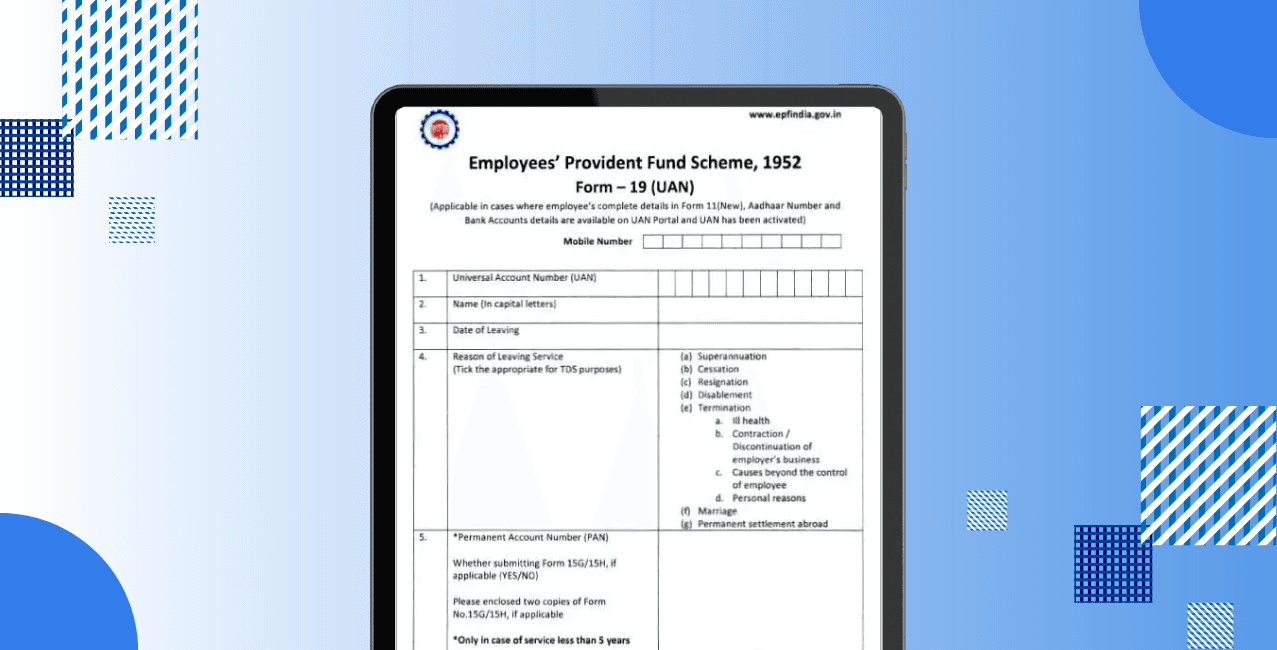
Form 19 in PF is the official claim form prescribed under the Employees’ Provident Fund Scheme, 1952, for final settlement of a PF account after a member leaves service.
PF gets deducted from your salary every month. Form 19 is the document that helps you withdraw the accumulated savings when your job ends.
When I resigned from my job and did not join another PF-covered organisation, my monthly PF deductions stopped. After completing the required unemployment period, I used Form 19 in PF to withdraw my entire PF balance, including my contribution, my employer’s contribution, and the interest earned.
Bonus Tip: EPFO plans to let members withdraw up to 75% of their PF balance via UPI and ATM by March 2026, making access faster and simpler.
This section explains eligibility based strictly on EPFO rules.
Read More - How to Withdraw Money from EPFO
How to Download Form 19 in PF?
The correct and updated Form 19 is essential because using an incorrect format can lead to claim rejection or delay.
Step 1: Visit the official website of the Employees’ Provident Fund Organisation to ensure the form is obtained from an authorised source only.
Step 2: Open the “Downloads” section available on the homepage of the EPFO website.
Step 3: Click on the “Forms” option listed under the Employees’ Provident Fund category.
Step 4: Locate Form 19 in the list of EPF forms and download the PDF file for final PF settlement.
Form 19 should always be downloaded only from the official EPFO portal to avoid errors and claim rejection.
Fill the Form 19 accurately because even small mistakes can delay Provident Fund settlement or lead to rejection by EPFO.
Verify all details carefully to ensure consistency with EPFO records. Accurate and complete information in Form 19 significantly reduces processing time
Follow these steps to submit Form 19 online through the official portal of the Employees’ Provident Fund Organisation. Online submission is faster and does not require employer attestation when KYC details are verified.
Step 1: Visit the official UAN Member Portal and log in using the Universal Account Number, password, and captcha.
Step 2: Verify that Aadhaar, PAN, and bank account details are correctly linked and approved under the “Manage” section of the portal.
Step 3: Navigate to the “Online Services” menu and select the option “Claim (Form 31, 19 & 10C)”.
Step 4: Enter the last four digits of the registered bank account to confirm bank details and proceed further.
*T&C Apply
Step 5: Select Form 19 as the claim type for final PF settlement and choose the appropriate reason for leaving service as displayed on the portal.
Step 6: Authenticate the claim using the Aadhaar-based OTP sent to the registered mobile number and submit the request.
After successful submission, the Provident Fund amount is credited directly to the registered bank account after verification by EPFO.
The form can also be submitted offline through the employer and the concerned EPFO office when online filing is not feasible.
The benefits of Form 19 help you decide whether PF withdrawal is the right choice after leaving a job.
Form 19 offers a straightforward and official way to access PF savings once employment ends permanently.
Also Read - How to Claim PF Amount in India
Limitations of Form 19 in PF
The limitations of Form 19 help you avoid incorrect PF claims and unnecessary rejections.
Form 19 should be used only after understanding its restrictions and confirming eligibility.
Form 19 in PF is the official way to withdraw the complete PF balance after leaving a job. It applies only when a PF transfer is not required. Check your PF details and file Form 19 correctly to access your savings without stress.
What is Form 19 in PF and why is it used?
Form 19 in PF is used to claim the final withdrawal of the Provident Fund balance after leaving employment. It allows withdrawal of the employee share, employer share, and accumulated interest as per the rules of the Employees’ Provident Fund Organisation.
Where can I submit the handwritten Form 19 PF form?
A handwritten or physical Form 19 must be submitted to the concerned EPFO regional office through the employer after proper attestation. Online submission through the UAN portal is recommended when KYC is verified.
No, Form 19 is not rejected solely because the EPS contribution appears after the exit date. EPFO processes the claim based on the exit records if the employer correctly updates the date of exit and completes the Full and Final settlement. It does not depend on the month in which the last contribution was posted.
No, Form 19 will not be rejected for non-submission of Form 15G. If taxable conditions apply, EPFO deducts 10% TDS automatically when PAN is available. Form 15G is optional and only meant to request non-deduction of tax when eligible.
Yes, Form 19 can be filed without PAN, but EPFO may deduct the maximum applicable TDS as per income tax rules. It helps avoid higher tax deductions and speeds up claim processing when you link your PAN.





.png&w=3840&q=75)
.png&w=3840&q=75)